
The ConfigMgr client install that failed SILENTLY for a month lol

Solvedclientconfigmgrsccm9 replies 路 392 views 路 started

Accepted solution

by Maya QuinteroJump to the reply

for internet-based or workgroup devices, cleint push wont work at all. use a manual install with the correct parameters, and for HTTPS or Enhanced HTTP, make sure the device trusts the site certificates. worked for me anyway 馃し

  1. ok weird one rolling out 40 laptops... the client install via client push fails over and over:
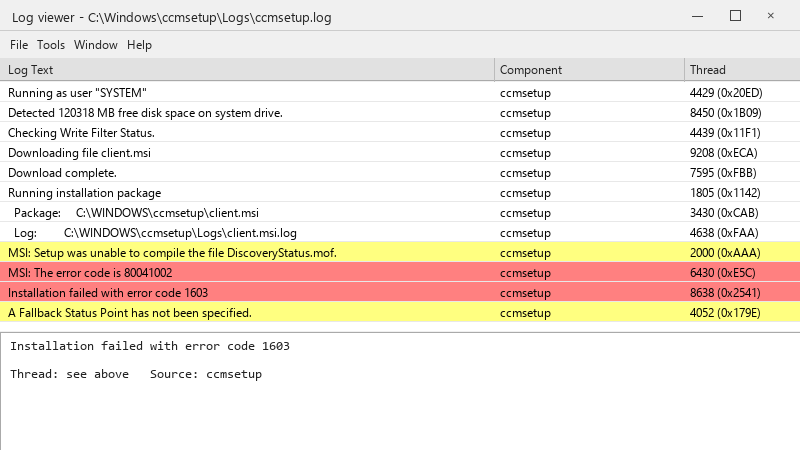
    Log viewer - C:\Windows\ccmsetup\Logs\ccmsetup.log

    Log viewer - C:\Windows\ccmsetup\Logs\ccmsetup.log
    Running as user "SYSTEM"
    Detected 120318 MB free disk space on system drive.
    Checking Write Filter Status.
    Downloading file client.msi
    Download complete.
    Running installation package
      Package:     C:\WINDOWS\ccmsetup\client.msi
      Log:         C:\WINDOWS\ccmsetup\Logs\client.msi.log
    MSI: Setup was unable to compile the file DiscoveryStatus.mof.
    MSI: The error code is 80041002
    Installation failed with error code 1603
    A Fallback Status Point has not been specified.
    

    the error is exit code 1603 馃槶 our consultant set this up years ago and left. I know just enough ConfigMgr to be dangerous. where should I start?

    We have a single primary site, a management point and a couple of distribution points. Nothing exotic. Im trying to find a methodical approach to this sooo i can fix it once rather than device by device. im about to throw this thing out the window lol


    4
  2. dont forget the client push installation account and the Allow connection fallback to NTLM setting; in hardened environments where NTLM is blocked, push fails with access denied even with correct permissions. fingers crossed 馃

    5 0 helpful
  3. @quietrider did u ever fix it?... make a backup before u touch the antivirus, learned that the hard way ??

    20 1 helpful
  4. oof exact same thing happened to my desktop last month, spent all weekend on configmgr and im still not done lmk how it goes

    0 10 helpful
  5. ahh classic read the logs in order. On the site server: ccm.log (client push attempts). On the client: C:\Windows\ccmsetup\Logs\ccmsetup.log, then client.msi.log for MSI errors. Search client.msi.log for return value 3 to find teh actual failing action. fingers crossed 馃

    10 0 helpful
  6. Accepted solution

    for internet-based or workgroup devices, cleint push wont work at all. use a manual install with the correct parameters, and for HTTPS or Enhanced HTTP, make sure the device trusts the site certificates. worked for me anyway 馃し

    6 13 helpful
  7. hmm idk I'd stop using client push for new devices entirely and install the client during imaging or via Intune. Fewer moving parts and no firewall exceptions.

    1 0 helpful
  8. ehh idk man that sounds like bad advice tbh

    0 3 helpful
  9. @mayaq873 omggg salvaged WMI, uninstalled the leftover client and reinstalled... exit code 1603 is gone and the devices report in. u guys are the best!!!

    2 4 helpful

Reply to this topic

Sign in or create an account to reply.
