PXE Boot Times Out On New Dell Laptops At The Imaging Bench. The DP Looks Perfectly Healthy

Solvedosdpxesccm37 replies · 597 views · started
  1. guys pls help some new Dell laptops at the imaging bench PXE boot, some don't. The failing ones end like this:
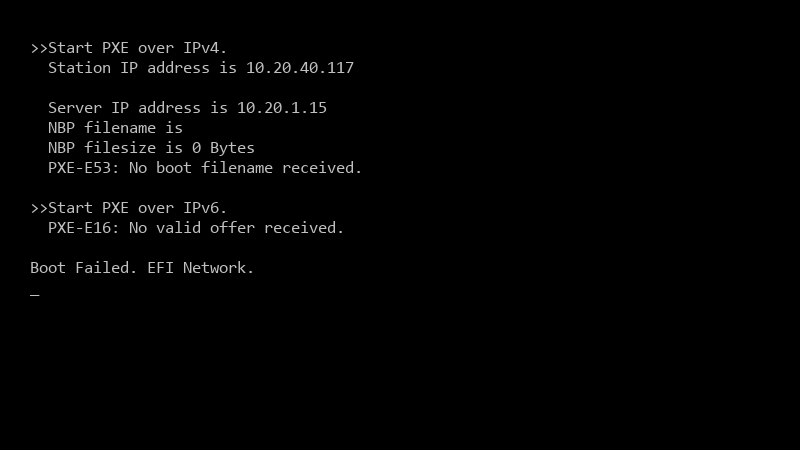
    >>Start PXE over IPv4.

    >>Start PXE over IPv4.
      Station IP address is 10.20.40.117
    
      Server IP address is 10.20.1.15
      NBP filename is
      NBP filesize is 0 Bytes
      PXE-E53: No boot filename received.
    
    >>Start PXE over IPv6.
      PXE-E16: No valid offer received.
    
    Boot Failed. EFI Network.
    

    same VLAN, same DP. the only difference i can see is firmware settings, but i dont know which ones matter.

    the working and failing machines are teh same model, just bought at different times, some came with different firmware defaults, which BIOS or UEFI settings usually matter for PXE with ConfigMgr? what am i doing wrong??

    2
  2. hmmm sapnning tree on access ports delays the link coming up, so teh PXE request times out before the port forwards, enable PortFast (or edge port) on client ports, very common after a switch replacement.

    1 0 helpful
  3. following, having the same problem hope that helps :)

    2 0 helpful
  4. @coppergarage works on paper, not in real life :/ try turning off teh fan curve first, fixed it for me idk maybe im wrong lol

    26 7 helpful
  5. told my boss it would take 10 minutes... its been 20 minutes... for me it was the default config xD swapped it and boom, fixed pls help 🙏

    4 1 helpful
  6. help!! i swear laptops is cursed

    thinking

    0 1 helpful
  7. start on the DP with SMSPXE.log (in teh SMS_DP or SMS_CCM logs folder). If u see no entry for teh devices MAC when it boots, the request isnt arriving: its a network problem. If it arrives and says smth like device is not in the database or no advertisements found, its a ConfigMgr targeting problem. hope that helps :)

    6 0 helpful
  8. @shaderworks works on paper, not in real life

    lol

    4 0 helpful
  9. if the device was imaged before or is a known computer without an active deployment, PXE will be ignored (abortpxe.com). Make sure the task sequence is deployed to a collection the device is in, available to 'media and PXE', or clear the required PXE deployment for that device.

    5 0 helpful
  10. yeahhh across subnets, PXE needs IP helpers (DHCP relay) on teh router or layer 3 switch pointing at both the DHCP server and the PXE-enabled DP 🔥 avoid DHCP options 66/67 if you can; they cant serve both UEFI and BIOS clinets correctly. fingers crossed 🤞

    0 6 helpful
  11. i swear pxe is cursed thx in advance!!

    facepalm

    3 0 helpful
  12. long time lurker first post lol lol this thread is gold thx in advance!!

    2 1 helpful
  13. @shaderworks nah thats not it, pxe has nothing to do with it. dumb question but how do i even check the extension

    5 0 helpful
  14. @fenna.okafor thank u this worked!!, for me it was teh thermal paste. swapped it and boom, fixed seriously made my day 😭🙏

    1 8 helpful
  15. also lol mods can we pin this thread :)

    2 2 helpful
  16. @nadia.nakamura thank u this worked!! u guys are the best!!!

    mindblown

    1 0 helpful
  17. my desktop is officially haunted thx in advance!!

    12 0 helpful

Reply to this topic

Sign in or create an account to reply.




