
The ConfigMgr client install that failed SILENTLY for a month lol

Solvedclientconfigmgrsccm9 replies · 382 views · started
Accepted solution by Maya Quintero — for internet based or workgroup devices, cleint push wont work at all. use a manual install with the correct parameters, and for HTTPS or…
  1. ok weird one rolling out 40 laptops... the client install via client push fails over and over:
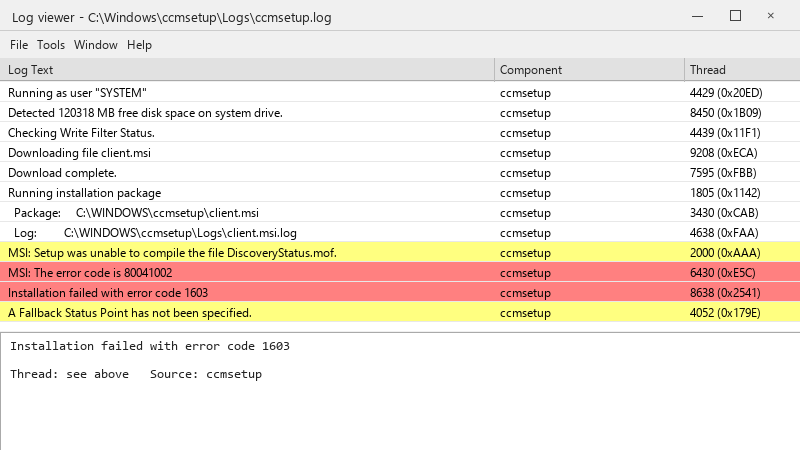
    Log viewer - C:\Windows\ccmsetup\Logs\ccmsetup.log

    Log viewer - C:\Windows\ccmsetup\Logs\ccmsetup.log
    Running as user "SYSTEM"
    Detected 120318 MB free disk space on system drive.
    Checking Write Filter Status.
    Downloading file client.msi
    Download complete.
    Running installation package
      Package:     C:\WINDOWS\ccmsetup\client.msi
      Log:         C:\WINDOWS\ccmsetup\Logs\client.msi.log
    MSI: Setup was unable to compile the file DiscoveryStatus.mof.
    MSI: The error code is 80041002
    Installation failed with error code 1603
    A Fallback Status Point has not been specified.
    

    the error is exit code 1603 😭 our consultant set this up years ago and left. I know just enough ConfigMgr to be dangerous. where should I start?

    We have a single primary site, a management point and a couple of distribution points. Nothing exotic. Im trying to find a methodical approach to this sooo i can fix it once rather than device by device. im about to throw this thing out the window lol


    4
  2. dont forget the client push installation account and the Allow connection fallback to NTLM setting; in hardened environments where NTLM is blocked, push fails with access denied even with correct permissions. fingers crossed 🤞

    5 0 helpful
  3. @quietrider did u ever fix it?... make a backup before u touch the antivirus, learned that the hard way ??

    20 1 helpful
  4. oof exact same thing happened to my desktop last month, spent all weekend on configmgr and im still not done lmk how it goes

    0 10 helpful
  5. ahh classic read the logs in order. On the site server: ccm.log (client push attempts). On the client: C:\Windows\ccmsetup\Logs\ccmsetup.log, then client.msi.log for MSI errors. Search client.msi.log for return value 3 to find teh actual failing action. fingers crossed 🤞

    10 0 helpful
  6. Accepted solution

    for internet-based or workgroup devices, cleint push wont work at all. use a manual install with the correct parameters, and for HTTPS or Enhanced HTTP, make sure the device trusts the site certificates. worked for me anyway 🤷

    6 13 helpful
  7. hmm idk I'd stop using client push for new devices entirely and install the client during imaging or via Intune. Fewer moving parts and no firewall exceptions.

    1 0 helpful
  8. ehh idk man that sounds like bad advice tbh

    0 3 helpful
  9. @mayaq873 omggg salvaged WMI, uninstalled the leftover client and reinstalled... exit code 1603 is gone and the devices report in. u guys are the best!!!

    2 4 helpful

Reply to this topic

Sign in or create an account to reply.
