
relinking hundreds of clips in davinci resolve without losing my mind

Solvedmedia-offlinerelinkvideo-editing7 replies · 215 views · started

Accepted solution

by TariqJump to the reply

ahh classic for the future, keep media inside one project folder structure and move only teh whole root folder.. 🙏 relinking then means pointing to one location.

  1. i opened my project in DaVinci Resolve after moving files to a new drive, and my heart sank:
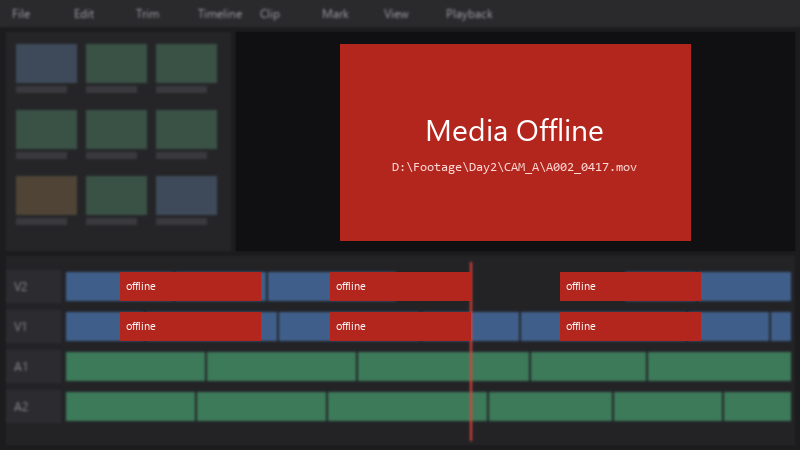
    Media Offline

    Media Offline
    D:\Footage\Day2\CAM_A\A002_0417.mov
    

    half my clips show Media Offline. the files are all still there, i can see them in Explorer. i have weeks of edits in this project. pls tell me theres a quick way to fix it.

    i havent saved the project since opening it, in case that makes things worse. im scared to click anything xD any careful step-by-step help would mean a lot. thank u in advance, Im genuinely stressed about this. pls help 🙏


    3
  2. hmmmm quick q did the file names stay the same, or did they change during the move?

    0 4 helpful
  3. Use Media Management in Resolve (File > Media Management) to copy or consolidate a project with all its media before moving to another computer.

    2 0 helpful
  4. ahh classic for the future, keep media inside one project folder structure and move only teh whole root folder.. 🙏 relinking then means pointing to one location.

    2 9 helpful
  5. changing teh drive letter is quick, but on a shared or multi-machine setup, consistent path mapping is the more robust long-term fix.

    2 6 helpful
  6. @tariq_silicon WOWWW changed teh drive letter back to teh old one and half my clips came online instantly 😤 Thank you! seriously made my day 😭🙏

    1 0 helpful

Reply to this topic

Sign in or create an account to reply.

