

How Do I Relink Only The Drone Shots In My Editing Software After Moving Files To A New Drive??

Solvedmedia-offlinerelinkvideo-editing2 replies · 314 views · started

Accepted solution

by Idris SatoJump to the reply

Dont re-import, relink. In Resolve, select the offline clips in teh Media Pool, right-click and choose Relink Selected Clips (or Relink Media), then point it to the folder containing the files. Resolve searches subfolders and reconnects them by name. good luck man!

lol

  1. Total panic moment. my editing software after moving files to a new drive:
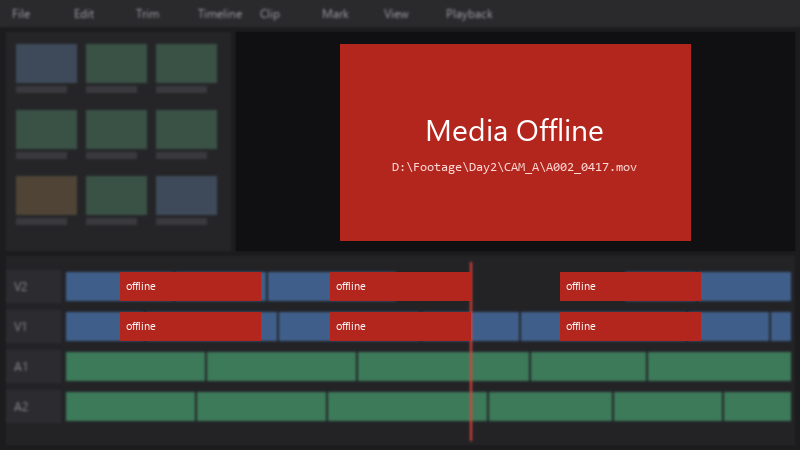
    Media Offline

    Media Offline
    D:\Footage\Day2\CAM_A\A002_0417.mov
    

    only the drone shots are offline. The footage isn't deleted, just moved. I really don't wanna rebuild the timeline by hand. How do I reconnect everything?

    Ive learned my lesson about moving files carelessly. Right now i just need to get this project working again, then Ill fix my organization. Any help would be hugely appreciated right now.
    1
  2. Accepted solution

    Dont re-import, relink. In Resolve, select the offline clips in teh Media Pool, right-click and choose Relink Selected Clips (or Relink Media), then point it to the folder containing the files. Resolve searches subfolders and reconnects them by name. good luck man!

    lol

    6 11 helpful
  3. @isato_0 changed the drive letter back to the old one and only the drone shots came online instantly, thank you!

    5 14 helpful

Reply to this topic

Sign in or create an account to reply.