uefi, legacy, dhcp options, ip helpers: what broke our pxe?

Solvedosdpxesccm7 replies · 388 views · started

Accepted solution

by JadeJump to the reply

oof start on the DP with SMSPXE.log (in the SMS_DP or SMS_CCM logs folder)... if you see no entry for the devices MAC when it boots, the request isnt arriving: its a network problem... if it arrives and says something like device is not in teh database or no advertisements found, its a ConfigMgr targeting problem.

  1. we need to image new Dell laptops at a branch site. they start a network boot and then:
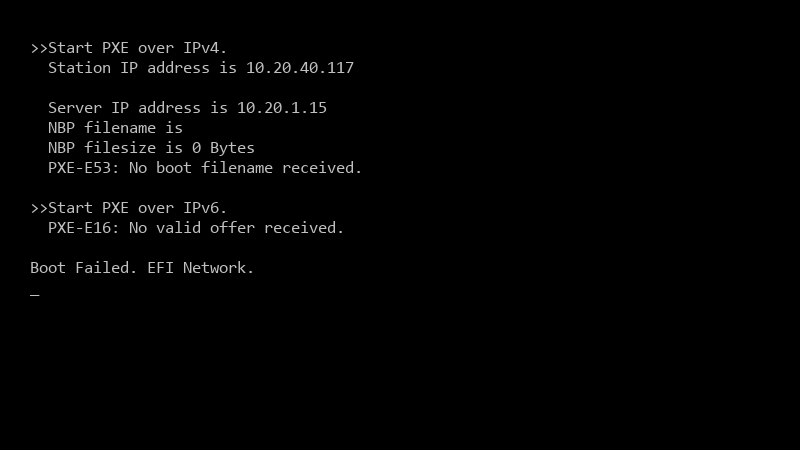
    >>Start PXE over IPv4.

    >>Start PXE over IPv4.
      Station IP address is 10.20.40.117
    
      Server IP address is 10.20.1.15
      NBP filename is
      NBP filesize is 0 Bytes
      PXE-E53: No boot filename received.
    
    >>Start PXE over IPv6.
      PXE-E16: No valid offer received.
    
    Boot Failed. EFI Network.
    

    The distribution point has PXE enabled and the boot imgaes are distributed. Other locations work fine 🙏 I have a stack of boxes and a deadline 🙏 Where do I look?

    The same task sequence works fine at teh main office, sooo teh content and deployment look correct. Im guessing its smth network-related, but idk how to prove it to the netowrk team.


    1
  2. Are client and DP in teh same subnet, or are IP helpers involved?

    thinking

    0 1 helpful
  3. across subnets, PXE needs IP helpers (DHCP relay) on the router or layer 3 siwtch pointing at both the DHCP server and the PXE-eanbled DP... avoid DHCP options 66/67 if u can; they can't serve both UEFI and BIOS clients correctly.

    2 2 helpful
  4. ahh classic check the NIC driver in teh boot image. If PXE strats and WinPE loads but then reboots without network, the boot image lacks the NIC driver for those Dell models. Add teh driver and update distribution points.

    2 6 helpful
  5. Accepted solution

    oof start on the DP with SMSPXE.log (in the SMS_DP or SMS_CCM logs folder)... if you see no entry for the devices MAC when it boots, the request isnt arriving: its a network problem... if it arrives and says something like device is not in teh database or no advertisements found, its a ConfigMgr targeting problem.

    5 6 helpful
  6. @jadef113 dude added the NIC driver to the boot image and redistributed. the new Dell lpatops now get all teh way into the task sequence. thanks!

    0 3 helpful

Reply to this topic

Sign in or create an account to reply.

