Is It The Firewall, The Account, Or The Boundary? 0x800706ba Again

Solvedclientconfigmgrsccm7 replies · 289 views · started

Accepted solution

by Tomas MendesJump to the reply

oh ive been there lol check prerequisites: ccmsetup downloads from the management point or a distribution point. if the device isnt in a boundary group with a reachable DP, the download fails. also verify /mp: and SMSSITECODE= if you install manually.

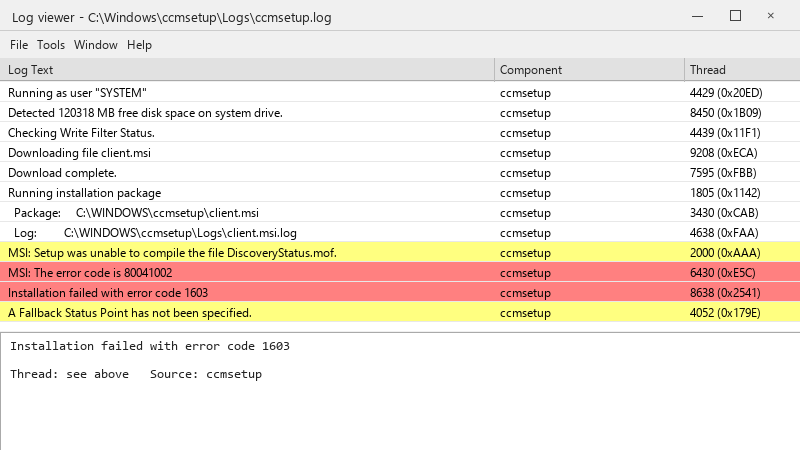
  1. We deploy the ConfigMgr client with teh task sequence, and teh new kiosk PCs just won't get it. The console shows:
    Log viewer - C:\Windows\ccmsetup\Logs\ccmsetup.log

    Log viewer - C:\Windows\ccmsetup\Logs\ccmsetup.log
    Running as user "SYSTEM"
    Detected 120318 MB free disk space on system drive.
    Checking Write Filter Status.
    Downloading file client.msi
    Download complete.
    Running installation package
      Package:     C:\WINDOWS\ccmsetup\client.msi
      Log:         C:\WINDOWS\ccmsetup\Logs\client.msi.log
    MSI: Setup was unable to compile the file DiscoveryStatus.mof.
    MSI: The error code is 80041002
    Installation failed with error code 1603
    A Fallback Status Point has not been specified.
    

    ccmsetup.log ends with 0x800706ba, other machines in teh same OU installed fine.. 🤦 ive been staring at logs for two hours and Im going in circles.

    The devices are domain joined, they're online, and I can browse to their admin share from my own workstation xD So I'm guessing permissions or firewall, but I'd like to know which log to read first instead of guessing. any ideas??


    15
  2. What does ccm.log on the site server show for one of the failed devices?

    10 0 helpful
  3. ahh classic read the logs in order... on teh site server: ccm.log (client push attempts)... on teh client: C:\Windows\ccmsetup\Logs\ccmsetup.log, then client.msi.log for MSI errors. Search client.msi.log for return value 3 to find the actual failing action. worked for me anyway 🤷

    1 0 helpful
  4. hmmm 0x80070005 (access denied) during client push usually means the push account isnt a local administrator on the target, or ADMIN$ isnt reachable xD 0x800706ba (RPC server unavaialble) means the firewall blocks WMI/RPC or teh device is offline. allow File and Printer Sharing and WMI inbound for the site server. hope that helps :)

    6 4 helpful
  5. Accepted solution

    oh ive been there lol check prerequisites: ccmsetup downloads from the management point or a distribution point. if the device isnt in a boundary group with a reachable DP, the download fails. also verify /mp: and SMSSITECODE= if you install manually.

    6 8 helpful
  6. hmmmm not sure about that i'd stop using clinet push for new devices entirely and install teh client during imaging or via Intune... fewer moving parts and no firewall exceptions.

    11 6 helpful
  7. @loosesage holy cow fixed the firewall rule for the new kiosk PCs and re-pushed. clients installed within the hour. owe u a beer 🍺

    0 5 helpful

Reply to this topic

Sign in or create an account to reply.
