TRIED INSTALLING A NEW GAME I JUST BOUGHT FIVE TIMES. 0X87E00017 EVERY TIME ugh

error-codeinstallxbox18 replies · 635 views · started
  1. guys pls help ive been trying to install a new game i just bought on my Xbox Series X for two days. Every time it gets partway and then shows this:
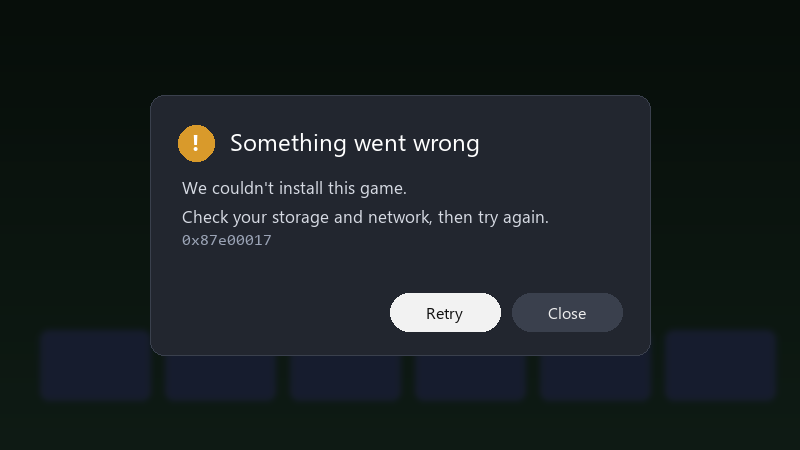
    Something went wrong

    Something went wrong
    We couldn't install this game.
    Check your storage and network, then try again.
    0x87e00017
    

    0x87e00017. I'm installing to an external USB hard drive. Other games launch fine, it's only teh install that fails. I restarted the console and checked my internet, both look okay. I'm out of ideas, and the weekend I planned for this game is disappearing. What do people usually do about this one??

    i'm fairly patient, but this is teh third evening in a row i've spent looking at progress bars instead of playing... any ideas are welcome. im about to throw this thing out the window lol

    0
  2. hmmm have you tried a full power cycle with teh cable unplugged? ?

    0 1 helpful
  3. cancel the install, go to My games & apps > Manage > Queue, remove everything, then start only that one install. multiple queued items sometimes clash.

    8 0 helpful
  4. im literally losing my mind here i swear xbox is cursed

    cry

    5 0 helpful
  5. if youre installing to an external USB hard drive, try the internal drive as a test, slow or failing external drives are a common source of install errors, and Series X|S games optimised for teh console must run from internal or expansion storage anyway. hope that helps :)

    0 0 helpful
  6. have u checked your series settings? mine were reset after an update lmk how it goes

    14 0 helpful
  7. not gonna lie this is driving me nuts told my boss it would take 10 minutes 😭 its been a whole week

    2 0 helpful
  8. as a last step before contacting support, use Settings > System > Console info > Reset console > Reset and keep my games & apps lmao it reinstalls teh system software without deleting your installed games.

    15 0 helpful
  9. been there man came here to say exactly this hope that helps :)

    4 0 helpful
  10. Check free space on the target drive under Settings > System > Storage devcies. Installs need room for teh download plus unpacking, so a drive that's nearly full can fail even if the final size looks like it fits. good luck man!

    0 1 helpful
  11. been there man do a full power cycle, not just a restart: hold teh Xbox button on the console for about 10 seconds until it turns off, unplug it for a minute, then turn it on again. this clears alot of stuck install states.

    thinking

    0 4 helpful
  12. ahh classic make a backup before u touch the cable, learned that the hard way worked for me anyway 🤷

    0 0 helpful
  13. also check the service status page for the store or downloads. if theres an ongoing issue, nothing on your side will help until its fixed.

    reading release notes like its a horror novel

    2 0 helpful
  14. long time lurker first post lol reading this at 2am instead of sleeping, no regrets pls help 🙏

    0 11 helpful
  15. @lambda_owl Cleared the queue, freed up space, and a new game i just bought finally installed on my Xbox Series X. Weekend saved. seriously made my day 😭🙏

    0 1 helpful

Reply to this topic

Sign in or create an account to reply.

