
pop!_os wont boot anymore and the last line just says not syncing

Solvedinitramfskernel-paniclinux5 replies · 238 views · started

Accepted solution

by Leon K.Jump to the reply

ok so on Debian, Ubuntu, Mint and Pop!_OS, regenerate it and refresh GRUB:

sudo update-initramfs -c -k all
sudo update-grub

on Fedora use sudo dracut --regenerate-all --force. on Arch use sudo mkinitcpio -P. lmk how it goes

  1. i need a calm person to talk me down.
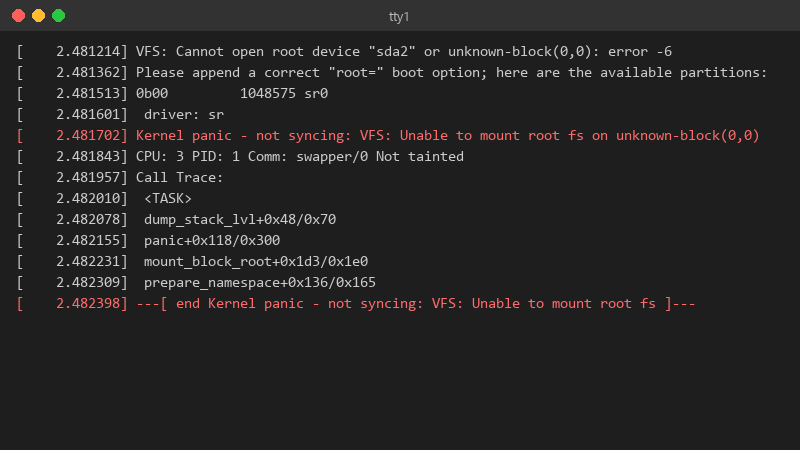
    2.481214 VFS: Cannot open root device "sda2" or unknown-block(0,0): error -6

    [    2.481214] VFS: Cannot open root device "sda2" or unknown-block(0,0): error -6
    [    2.481362] Please append a correct "root=" boot option; here are the available partitions:
    [    2.481513] 0b00         1048575 sr0
    [    2.481601]  driver: sr
    [    2.481702] Kernel panic - not syncing: VFS: Unable to mount root fs on unknown-block(0,0)
    [    2.481843] CPU: 3 PID: 1 Comm: swapper/0 Not tainted
    [    2.481957] Call Trace:
    [    2.482010]  <TASK>
    [    2.482078]  dump_stack_lvl+0x48/0x70
    [    2.482155]  panic+0x118/0x300
    [    2.482231]  mount_block_root+0x1d3/0x1e0
    [    2.482309]  prepare_namespace+0x136/0x165
    [    2.482398] ---[ end Kernel panic - not syncing: VFS: Unable to mount root fs ]---
    

    thats my Pop!_OS laptop after a routine kernel update 😂 it just freezes there with teh caps lock light blinking. i have a live USB from when i installed it. im comfortable with a terminal but Ive never had to repair a boot before. is this fixable without reinstalling? i can boot teh live USB and see teh drives partitions, and my files look like theyre still there 👍 so the disk is alive. i just dont understand what teh system is missing at boot. im about to throw this thing out the window lol


    rage

    12
  2. if you changed the disk or partition layout, copmare the UUIDs from blkid with /etc/fstab and the root= parameter in ur GRUB entry. A stale UUID gives the same panic.

    1 2 helpful
  3. ok so on Debian, Ubuntu, Mint and Pop!_OS, regenerate it and refresh GRUB:

    sudo update-initramfs -c -k all
    sudo update-grub
    

    on Fedora use sudo dracut --regenerate-all --force. on Arch use sudo mkinitcpio -P. lmk how it goes

    5 6 helpful
  4. ehh some will say reinstall, and honestly if you have a separate /home partition a reinstall is quick 😅 but this specific panic is almost always fixable in a few commands.

    2 4 helpful

Reply to this topic

Sign in or create an account to reply.