
Booted the older kernel and it WORKS. So whats wrong with the new one?

Solvedinitramfskernel-paniclinux4 replies Β· 112 views Β· started
Accepted solution by Nell Okafor β€” ok so check that /boot wasnt full during the update. A full boot partition causes exactly this: teh kernel copies, teh initramfs doesnt πŸ”₯…
  1. ugh. i need a calm person to talk me down.
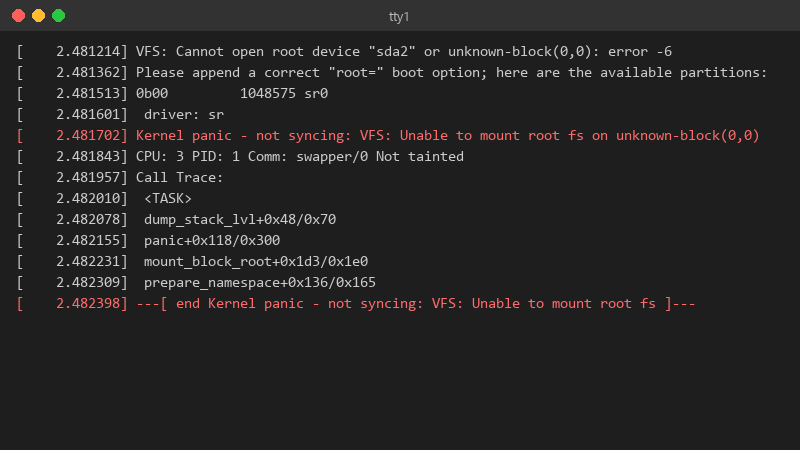
    2.481214 VFS: Cannot open root device "sda2" or unknown-block(0,0): error -6

    [    2.481214] VFS: Cannot open root device "sda2" or unknown-block(0,0): error -6
    [    2.481362] Please append a correct "root=" boot option; here are the available partitions:
    [    2.481513] 0b00         1048575 sr0
    [    2.481601]  driver: sr
    [    2.481702] Kernel panic - not syncing: VFS: Unable to mount root fs on unknown-block(0,0)
    [    2.481843] CPU: 3 PID: 1 Comm: swapper/0 Not tainted
    [    2.481957] Call Trace:
    [    2.482010]  <TASK>
    [    2.482078]  dump_stack_lvl+0x48/0x70
    [    2.482155]  panic+0x118/0x300
    [    2.482231]  mount_block_root+0x1d3/0x1e0
    [    2.482309]  prepare_namespace+0x136/0x165
    [    2.482398] ---[ end Kernel panic - not syncing: VFS: Unable to mount root fs ]---
    

    that's my Linux Mint laptop after switching to an NVMe drive. it just freezes there with teh caps lock light blinking. I have a live USB from when I installed it. I'm comfortable with a terminal but I've never had to repair a boot before 😭 is this fixable without reinstalling? I can boot the live USB and see teh drive's partitions, and my files look like they're still there. so the disk is alive. I just don't understand what the system is missing at boot.

    facepalm

    2
  2. been there man if you changed teh disk or partition layout, compare the UUIDs from blkid with /etc/fstab and teh root= parameter in your GRUB entry. A stale UUID gives the same panic. worked for me anyway 🀷

    0 6 helpful
  3. Accepted solution

    ok so check that /boot wasnt full during the update. A full boot partition causes exactly this: teh kernel copies, teh initramfs doesnt πŸ”₯ df -h /boot and remove old kernels with your package manager, not by deleting files. worked for me anyway 🀷

    1 8 helpful
  4. ok update: did what @nokafor-2zj said and its fine now πŸ‘ reading this at 2am instead of sleeping, no regrets seriously made my day πŸ˜­πŸ™

    mindblown

    1 0 helpful
  5. @nokafor-2zj wowww ok removed two old kernels, regenerated the initramfs, ran update-grub and the new kernel boots perfectly lmao backed up my photos first, just in case. thank u! seriously made my day πŸ˜­πŸ™

    39 0 helpful

Reply to this topic

Sign in or create an account to reply.

