THE EDITOR SAYS MEDIA OFFLINE, BUT THE FILES ARE RIGHT THERE

Solvedmedia-offlinerelinkvideo-editing8 replies · 410 views · started
Accepted solution by Lars — ahh classic if file names changed too, relinking by name wont work. use the clips metadata (timecode and duration) and relink manually, or…
  1. ok weird one i opened my project in DaVinci Resolve after the external drive getting a new letter, and my heart sank:
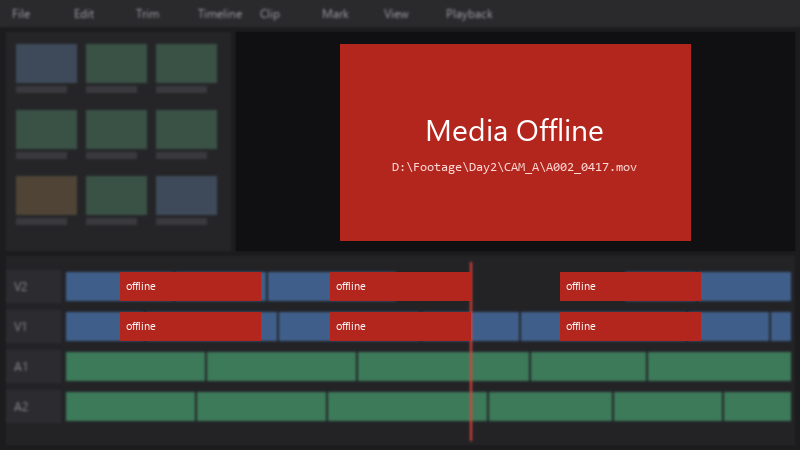
    Media Offline

    Media Offline
    D:\Footage\Day2\CAM_A\A002_0417.mov
    

    just the audio files show 'Media Offline'. The files are all still there, I can see them in Explorer. I have weeks of edits in this project. Please tell me there's a quick way to fix it.

    I haven't saved the project since opening it, in case that makes things worse. I'm scared to click anything. any careful step-by-step help would mean a lot. thank u in advance, I'm genuinely stressed about this.

    39
  2. lol same thing happened to me if drive letters change on external drives, assign a fixed letter in Disk Management: right-click the volume, Change Drive Letter and Paths, and set teh one the project expects.

    0 7 helpful
  3. oh ive been there lol dont re-import, relink. in Resolve, select the offline clips in teh Media Pool, right-click and choose Relink Selected Clips (or Relink Media), then point it to the folder containing the files. resolve searches subfolders and reconnects them by name. fingers crossed 🤞

    4 3 helpful
  4. Accepted solution

    ahh classic if file names changed too, relinking by name wont work. use the clips metadata (timecode and duration) and relink manually, or restore teh original names if possible. hope that helps :)

    0 8 helpful
  5. Id duplicate teh project before relinking 👍 If smth relinks to teh wrong clip, you still have a clean version to go back to. but hey ymmv

    0 1 helpful
  6. @lfontaine used Media Management to consolidate everything into one folder. no more offline media when switching machines. cant believe it was that simple lol

    0 1 helpful

Reply to this topic

Sign in or create an account to reply.

