our new dell laptops wont pxe boot. other models do. why?

Solvedosdpxesccm8 replies · 139 views · started
Accepted solution by Gabe N. — ahh classic start on the DP with SMSPXE.log (in the SMS DP or SMS CCM logs folder). If you see no entry for the devices MAC when it boots,…
  1. not gonna lie this is driving me nuts PXE was working last week at a remote warehouse. then teh network team swapped a switch, and now new Dell laptops show this:
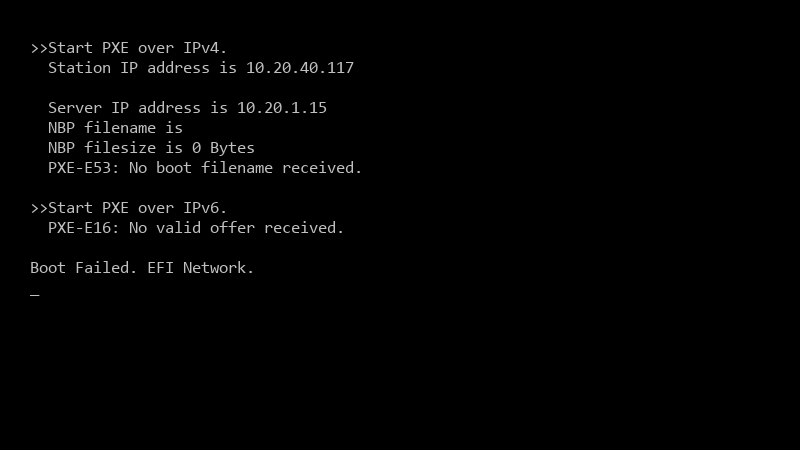
    >>Start PXE over IPv4.

    >>Start PXE over IPv4.
      Station IP address is 10.20.40.117
    
      Server IP address is 10.20.1.15
      NBP filename is
      NBP filesize is 0 Bytes
      PXE-E53: No boot filename received.
    
    >>Start PXE over IPv6.
      PXE-E16: No valid offer received.
    
    Boot Failed. EFI Network.
    

    They say the network is fine. i say it isnt. Whos right??

    ive already redistributed the boot images and restarted teh WDS service on teh distribution point just in case, nothing changed. what would you check first before i start an argument with networking? what am i doing wrong??

    6
  2. if the device was imaged before or is a known computer without an active deployment, PXE will be ignored (abortpxe.com). Make sure the task sequence is deployed to a collection teh deivce is in, available to media and PXE, or clear the required PXE deployment for that device.

    1 0 helpful
  3. ok so UEFI vs legacy: make suree the boot image architecture and teh device firmware match (x64 boot image for UEFI). if Secure Boot is on, thats normally fine with teh signed WDS/ConfigMgr boot files, but outdated boot files can fail. hope that helps :)

    0 1 helpful
  4. honestly just reset the thermal paste and save yourself teh pain worked for me anyway 🤷

    3 1 helpful
  5. Accepted solution

    ahh classic start on the DP with SMSPXE.log (in the SMS_DP or SMS_CCM logs folder). If you see no entry for the devices MAC when it boots, the request isnt arriving: its a network problem. If it arrives and says something like device is not in the database or no advertisements found, its a ConfigMgr targeting problem.

    3 13 helpful
  6. oof for me it was the cache. swapped it and boom, fixed

    2 0 helpful
  7. wait what id consider Windows Autopilot for new hardware instead of PXE. No network dependencies, and imaging becomes optional. just my 2 cents

    13 0 helpful
  8. so annoyed rn spent half the night on warehouse and im still not done

    rage

    0 1 helpful
  9. @gnolan dude network team added the DP as an IP helper target. PXE works at a remote warehouse again.

    thumbsup

    0 1 helpful

Reply to this topic

Sign in or create an account to reply.


