AUDIO DRIFT IN RESOLVE THAT GETS WORSE EVERY MINUTE

audio-syncframe-ratevideo-editing5 replies 路 226 views 路 started
  1. spent hours on an edit only to notice the audio drifts after 10 minutes. heres what I see in Resolve:
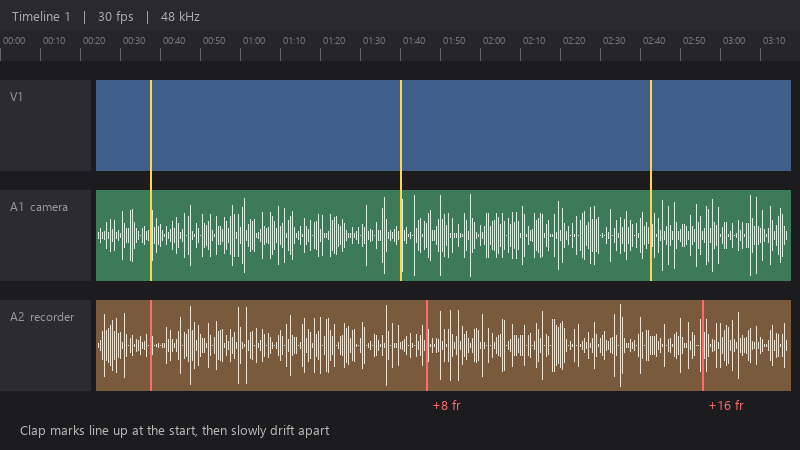
    Timeline 1 | 30 fps | 48 kHz

    Timeline 1   |   30 fps   |   48 kHz
    A1  camera
    A2  recorder   +8 fr   +16 fr
    Clap marks line up at the start, then slowly drift apart
    

    The source is a gameplay capture. It plays fine in a media player. Why does the editor show it differently?

    Short clips are fine. The problem only shows up in longer recordings, which is exactly what I need to edit. Any idea what's causing it? Thanks in adavnce, this one is driving me nuts. seriously need help here 馃槶

    1
  2. hmmmm quick q what does media info say about the frame rate mode: constant or variable?

    2 0 helpful
  3. been there man drift that grows over time is almost always variable frame rate (VFR). Phones, screen recorders and some capture tools record VFR. Check the file with a media info tool: Frame rate mode: Variable confirms it.

    5 0 helpful
  4. for long recordings, check the audio sample rate in teh clip attributes. A 44.1 kHz file interperted as 48 kHz will drift steadily. fingers crossed 馃

    lol

    34 3 helpful
  5. @rowan_cache yesss matching the timeline to 29.97 fixed it. Cant believe it was that small a difference. seriously made my day 馃槶馃檹

    0 5 helpful

Reply to this topic

Sign in or create an account to reply.
