a teammate's pr broke vite: cannot find module after a fresh clone. where do i start?

Solvedbuildjavascriptnpm2 replies 路 190 views 路 started

Accepted solution

by Hugo EriksenJump to the reply

been there man pin teh Node version. add an .nvmrc or teh engines field in package.json, and make CI use the same major version 馃し compare node -v and npm -v locally and in CI; many nothing changed failures are actually a new Node vesrion on teh runner.

  1. not gonna lie this is driving me nuts merged a dependency update PR and now Vite refuses to build:
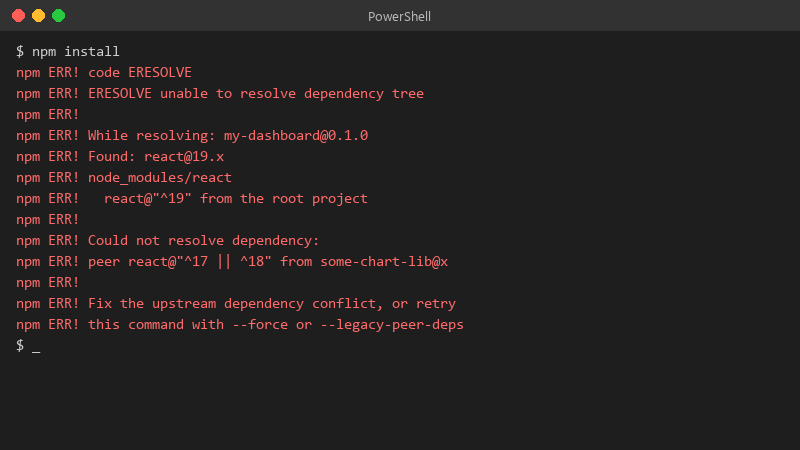
    $ npm install

    $ npm install
    npm ERR! code ERESOLVE
    npm ERR! ERESOLVE unable to resolve dependency tree
    npm ERR!
    npm ERR! While resolving: my-dashboard@0.1.0
    npm ERR! Found: react@19.x
    npm ERR! node_modules/react
    npm ERR!   react@"^19" from the root project
    npm ERR!
    npm ERR! Could not resolve dependency:
    npm ERR! peer react@"^17 || ^18" from some-chart-lib@x
    npm ERR!
    npm ERR! Fix the upstream dependency conflict, or retry
    npm ERR! this command with --force or --legacy-peer-deps
    

    the error is Cannot find module after a fresh clone 馃う the PR looked harmless, a few version bumps. id rather understand the cause than blindly revert or slap a flag on it. whats the right way to read this error and fix it properly? happy to share more of teh log if someone tells me which lines matter. any ideas??

    4
  2. Accepted solution

    been there man pin teh Node version. add an .nvmrc or teh engines field in package.json, and make CI use the same major version 馃し compare node -v and npm -v locally and in CI; many nothing changed failures are actually a new Node vesrion on teh runner.

    0 7 helpful
  3. hmmmm not sure about that pinning Node is good, but don't pin forever. Schedule upgrades, otherwise you'll hit a cliff when ur version reaches end of life. but hey ymmv

    5 1 helpful

Reply to this topic

Sign in or create an account to reply.