Why Can't The Free Resolve Version Open A Screen Recording When My Media Player Can?

Solvedcodecimportvideo-editing8 replies · 285 views · started
Accepted solution by Nell Y. — the free version of Resolve on Windows has limited H.264/H.265 support for certain profiles, especially 10 bit 4:2:2. resolve on Linux…
  1. so annoyed rn every project starts teh same way: i import a screen recoridng into the free Resolve vesrion and get clips wont import at all:
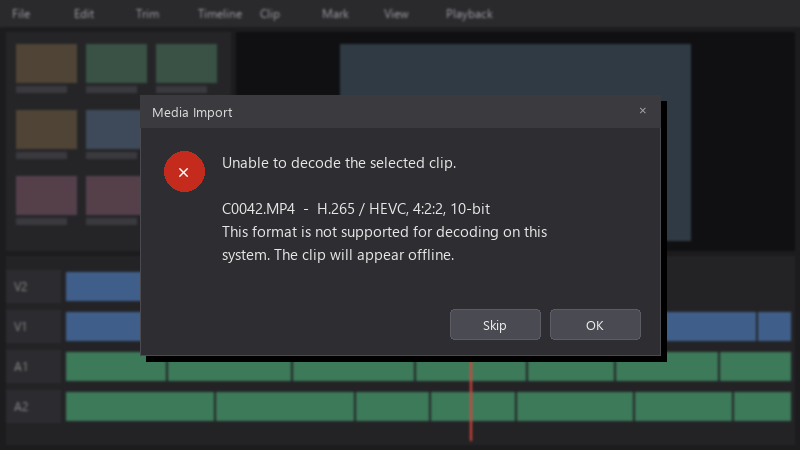
    Media Import

    Media Import
    Unable to decode the selected clip.
    
    C0042.MP4  -  H.265 / HEVC, 4:2:2, 10-bit
    This format is not supported for decoding on this
    system. The clip will appear offline.
    

    ive been converting files with random online tools, but teh quality suffres. is there a proper workflow??

    I'd like a workflow that doesn't destroy quality or require a different converter every time. ideally something I can set up once and then forget about 😂 I can post the media info output if that helps anyone diagnose it.


    29
  2. ok so phone footage is often variable frame rate. Transcoding to constant frame rate also prevents audio sync drift later. fingers crossed 🤞

    thumbsup

    8 1 helpful
  3. ok weird one reading this at 2am instead of sleeping, no regrets

    6 1 helpful
  4. yeahhh in OBS, set recording to a foramt ur editor handles well, for example MP4/MOV with a constant frame rate, or record to MKV and use OBSs built-in File > Remux Recordings.

    1 0 helpful
  5. oof same issue here on my moms pc. following this thread. which version are you on?

    2 2 helpful
  6. been there man try turning off teh extension first, fixed it for me worked for me anyway 🤷

    lol

    2 2 helpful
  7. Accepted solution

    the free version of Resolve on Windows has limited H.264/H.265 support for certain profiles, especially 10-bit 4:2:2. resolve on Linux doesnt support H.264/AAC in the free verison at all ;) check what your version supports before assuming the files are broken.

    thumbsup

    0 6 helpful
  8. hmmmm not sure about that online converters are risky for client footage, both for quality and privacy. Use a local tool like FFmpeg or HandBrake instead. idk maybe im wrong lol

    1 2 helpful

Reply to this topic

Sign in or create an account to reply.


