is my venv haunted? dotenv vanishes the moment vs codes run button takes over

Solvedpippythonvenv13 replies · 166 views · started
Accepted solution by Zane M. — ahh classic stop using bare pip. use python m pip install <package with the exact interpreter that runs the app. that way the package…
  1. long time lurker first post lol i swear I installed it. pip install dotenv finished cleanly, pip list shows it, and when i run the app by hand everything works... then VS Codes Run button starts it and i get this:
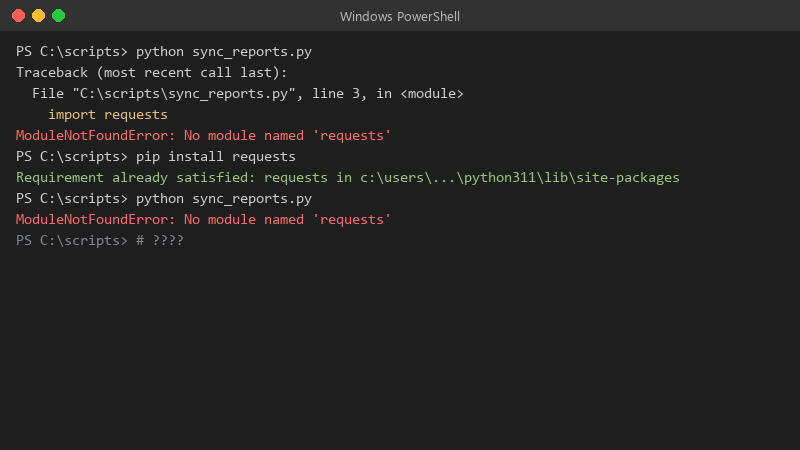
    PS C:\scripts> python sync_reports.py

    PS C:\scripts> python sync_reports.py
    Traceback (most recent call last):
      File "C:\scripts\sync_reports.py", line 3, in <module>
        import requests
    ModuleNotFoundError: No module named 'requests'
    PS C:\scripts> pip install requests
    Requirement already satisfied: requests in c:\users\...\python311\lib\site-packages
    PS C:\scripts> python sync_reports.py
    ModuleNotFoundError: No module named 'requests'
    

    same server, same repo, same user (i think)... ive reinstalled three times and even nuked the venv once, what am i missing??

    for context, this is Python 3.12 on a plain Linux VM, nothing exotic :D i'm fine at writing Python but environments have always felt like dark magic to me. any pointers on how to see what teh service actually sees would be amazing.

    facepalm

    0
  2. what does sys.executable print when the app runs under the Docker image, not in ur shell? ?

    2 2 helpful
  3. ok so i'm on Python 3.12 in the venv but the system Python is older... i never noticed because teh version banner looked similar. idk what else to say tbh

    6 6 helpful
  4. yeahhh in Docker, the classic mistake is installing into one stage of a multi-stage build and copying only the app into the final stage. Either copy the venv over (COPY --from=build /opt/venv /opt/venv and put /opt/venv/bin on PATH) or install in the final stage.

    if u prefer video, this one is solid:

    ▶ How to Fix ModuleNotFoundError No Module Named Error In Python

    3 1 helpful
  5. oof watch out for package name vs import name. pip install python-dotenv gives u import dotenv, psycopg2-binary gives import psycopg2, PyYAML gives import yaml. If you installed a similarly named but different package the improt will fail even though pip is happy. good luck man!

    7 0 helpful
  6. lol same thing happened to me print sys.path at startup in teh failing context. If u see a different site-packages than the one where pip put the package, u have your answer in one log line.

    0 2 helpful
  7. Activating a venv only changes PATH in your interactive shell... services, cron and IDE run configs do not inherit that... for systemd set ExecStart=/opt/app/venv/bin/python app.py (or venv/bin/gunicorn), and for cron use the full path too.

    lol

    2 3 helpful
  8. ahh classic stop using bare pip. use python -m pip install <package> with the exact interpreter that runs the app. that way the package lands in the same site-packages that the interpreter searches.

    thinking

    0 2 helpful
  9. wait does this also apply to codes? ?

    1 0 helpful
  10. lol this thread is gold what am i doing wrong??

    facepalm

    2 2 helpful
  11. wait what id skip venv warngling on servers and just ship a container where theres exactly one Python. Fewer moving parts.

    0 2 helpful
  12. @mutextrace omg finally it was the import name. i'd installed the wrong package :) Removed it, installed the right one with python -m pip, and dotenv imports fine now. owe u a beer 🍺

    1 0 helpful

Reply to this topic

Sign in or create an account to reply.