
my a webcam recording is half a second out of sync by the end

Solvedaudio-syncframe-ratevideo-editing5 replies · 237 views · started
Accepted solution by Paula Adler — Convert VFR to constant frame rate (CFR) before editing: ffmpeg i input.mp4 vf fps=30 c:v libx264 crf 18 c:a aac b:a 192k output.mp4 (use…
  1. help!! i recorded a webcam recording and dropped it into Resolve, everythings perfectly in sync at the start, but after an hour teh audio is noticeably behind:
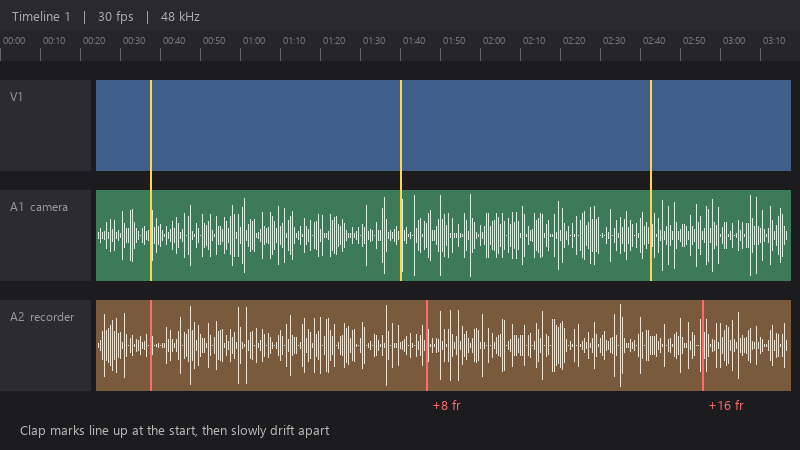
    Timeline 1 | 30 fps | 48 kHz

    Timeline 1   |   30 fps   |   48 kHz
    A1  camera
    A2  recorder   +8 fr   +16 fr
    Clap marks line up at the start, then slowly drift apart
    

    cutting and nudging every few minutes is driving me crazy... is there a real fix for this??

    ive tried re-importing the clip and restarting teh editor. the drift is identical every time, slowly growing as the clip goes on... i can post media info details if that helps. im about to throw this thing out the window lol


    facepalm

    2
  2. in screen recording software like OBS, set a constant frame rate and match the audio sample rate (48 kHz) to the project, mismatched sample rates can also cause drift.

    6 8 helpful
  3. Accepted solution

    Convert VFR to constant frame rate (CFR) before editing: ffmpeg -i input.mp4 -vf fps=30 -c:v libx264 -crf 18 -c:a aac -b:a 192k output.mp4 (use the frame rate of your project). or transcode to an intermediate like DNxHR at a fixed rate. worked for me anyway 🤷

    1 4 helpful

Reply to this topic

Sign in or create an account to reply.

