IS IT THE FIREWALL, THE ACCOUNT, OR THE BOUNDARY? 0X87D00227 AGAIN

clientconfigmgrsccm8 replies · 384 views · started
  1. not gonna lie this is driving me nuts we deploy teh ConfigMgr client with client push, and a whole branch office just won't get it, the console shows:
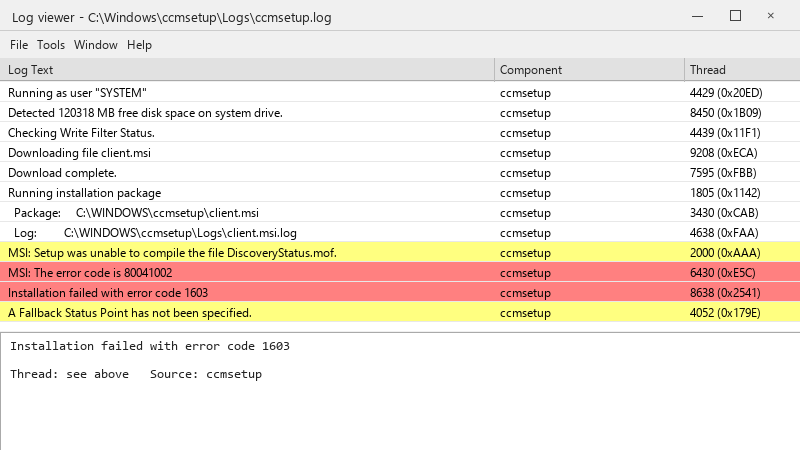
    Log viewer - C:\Windows\ccmsetup\Logs\ccmsetup.log

    Log viewer - C:\Windows\ccmsetup\Logs\ccmsetup.log
    Running as user "SYSTEM"
    Detected 120318 MB free disk space on system drive.
    Checking Write Filter Status.
    Downloading file client.msi
    Download complete.
    Running installation package
      Package:     C:\WINDOWS\ccmsetup\client.msi
      Log:         C:\WINDOWS\ccmsetup\Logs\client.msi.log
    MSI: Setup was unable to compile the file DiscoveryStatus.mof.
    MSI: The error code is 80041002
    Installation failed with error code 1603
    A Fallback Status Point has not been specified.
    

    ccmsetup.log ends with 0x87d00227. other machines in the same OU installed fine. ive been staring at logs for two hours and Im going in circles.

    the devices are domain joined, theyre online, and i can browse to their admin share from my own workstation :/ so Im guessing permissions or firewlal, but Id like to know which log to read first instead of guessing. thx in advance!!


    1
  2. hmmm are the failing devices inside a boundary group that has a distribution point? ??

    1 0 helpful
  3. yeah so ccm.log says it couldn't connect to ADMIN$ on those devices. The firewall policy differs for a whole branch office. hope thats enough info 😅

    12 0 helpful
  4. lol same thing happened to me check prerequisites: ccmsetup downloads from the management point or a distribution point. If teh device isnt in a boundary group with a reachable DP, the download fails. Also verify /mp: and SMSSITECODE= if you install manually. hope that helps :)

    15 0 helpful
  5. Dont forget the client push installation account and the Allow connection fallback to NTLM setting; in hardened environments where NTLM is blocked, push fails with access denied even with correct permissions. lmk how it goes

    6 0 helpful
  6. oh ive been there lol pro tip: write down what u change. i didnt and had to redo branch from scratch good luck man!

    0 2 helpful
  7. oh ive been there lol 0x80070005 (access denied) during client push usually means teh push account isnt a local administrator on the target, or ADMIN$ isnt reachable. 0x800706ba (RPC server unavailable) means the firewall blocks WMI/RPC or the device is offline. allow File and Printer Sharing and WMI inbound for the site server. good luck man!

    1 2 helpful
  8. nah tbh before blaming WMI, check for third-party security software blocking ccmsteup... it cuases the same symptoms.

    5 3 helpful
  9. @kofic744 yesss salvaged WMI, uninstalled the leftover client and reinstalled. 0x87d00227 is gone and the devices report in. u guys are the best!!!

    0 2 helpful

Reply to this topic

Sign in or create an account to reply.