is a smart warning on a open-box 2tb nvme grounds for a refund?

Solvedrefurbishedsmartssd5 replies 路 367 views 路 started

Accepted solution

by Rowan BanerjeeJump to the reply

also update teh drive firmware with teh vendor's SSD tool if the brand has one. some health warnings are firmware reporting bugs, but only trust that explanation if the vendor actually documents it. worked for me anyway 馃し

  1. Confession: I chose the open-box 2TB NVMe to save money for a better GPU. After ten days I ran a SMART check because a friend told me to.
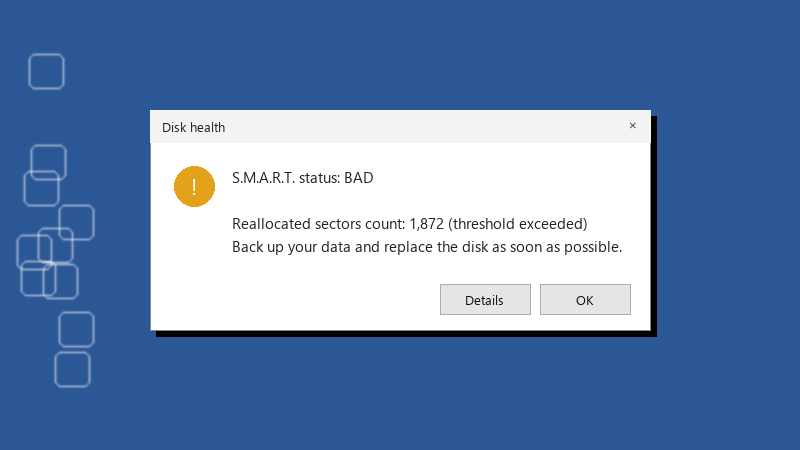
    Disk health

    Disk health
    S.M.A.R.T. status: BAD
    
    Reallocated sectors count: 1,872 (threshold exceeded)
    Back up your data and replace the disk as soon as possible.
    

    The Media and Data Integrity Errors line is yellow. The seller says refurbished drives are fully tested. I am now wondering what exactly they tested. Is this a normal state for a second hand SSD or a warning that it is near the end??

    1
  2. hmmm if Media and Data Integrity Errors or reallocated sectors are above zero and rising, treat it as failing. run the check again in a few days. A stable number is a scar, a climbing number is a countdown.

    0 6 helpful
  3. oof try turning off the firmware first, fixed it for me. exact same thing happened to my brand new build last month fingers crossed 馃

    35 2 helpful
  4. Accepted solution

    also update teh drive firmware with teh vendor's SSD tool if the brand has one. some health warnings are firmware reporting bugs, but only trust that explanation if the vendor actually documents it. worked for me anyway 馃し

    1 7 helpful
  5. spent all weekend on ssd and im still not done thx in advance!!

    rage

    6 1 helpful
  6. @rowan.banerjee wowww ok number stayed stable for two weeks, sooo teh open-box 2TB NVMe is now my game library drive only... projects moved to a new SSD with a nightly bakcup.

    2 0 helpful

Reply to this topic

Sign in or create an account to reply.
