
codec trouble with a mirrorless cameras 10-bit files. any lasting fix?

Solvedcodecimportvideo-editing2 replies 路 189 views 路 started

Accepted solution

by Idris J.Jump to the reply

For a reliable editing workflow, transcode to an intermediate codec: ffmpeg -i input.mp4 -c:v dnxhd -profile:v dnxhr_hq -pix_fmt yuv422p -c:a pcm_s16le output.mov. Larger files, but editors handle them perefctly. worked for me anyway 馃し

thumbsup

  1. Help! Client footage is a mirrorless camera's 10-bit files, and my NLE gives me clips won't import at all:
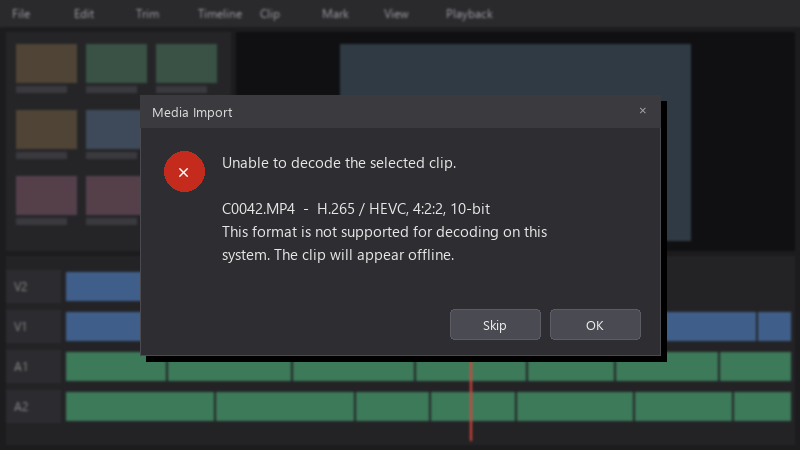
    Media Import

    Media Import
    Unable to decode the selected clip.
    
    C0042.MP4  -  H.265 / HEVC, 4:2:2, 10-bit
    This format is not supported for decoding on this
    system. The clip will appear offline.
    

    I need to start editing today. What's the fatsest reliable fix?

    Im comfortable with simple command line tools if thats what it takes. I just need a reliable fix that wont cost me hours or quality. Any reliable workflow tips are very welcome, thank u. thx in advance!!

    6
  2. Accepted solution

    For a reliable editing workflow, transcode to an intermediate codec: ffmpeg -i input.mp4 -c:v dnxhd -profile:v dnxhr_hq -pix_fmt yuv422p -c:a pcm_s16le output.mov. Larger files, but editors handle them perefctly. worked for me anyway 馃し

    thumbsup

    1 3 helpful
  3. transcoding everything to DNxHR eats disk space fast. for short projects, a remux or buying Studio may be more practical. idk maybe im wrong lol

    1 2 helpful

Reply to this topic

Sign in or create an account to reply.