IS MY VENV HAUNTED? DOTENV VANISHES THE MOMENT THE DOCKER IMAGE TAKES OVER !!

Solvedpippythonvenv18 replies · 550 views · started
Accepted solution by Una Walsh — ahh classic watch out for package name vs import name. pip install python dotenv gives u import dotenv, psycopg2 binary gives import…
  1. i swear i installed it. pip install dotenv finished cleanly, pip list shows it, and when i run the app by hand everything works. then the Docker image starts it and i get this:
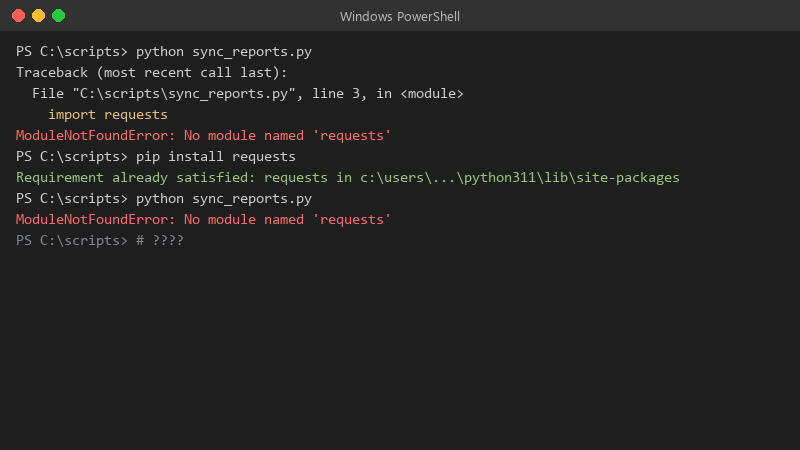
    PS C:\scripts> python sync_reports.py

    PS C:\scripts> python sync_reports.py
    Traceback (most recent call last):
      File "C:\scripts\sync_reports.py", line 3, in <module>
        import requests
    ModuleNotFoundError: No module named 'requests'
    PS C:\scripts> pip install requests
    Requirement already satisfied: requests in c:\users\...\python311\lib\site-packages
    PS C:\scripts> python sync_reports.py
    ModuleNotFoundError: No module named 'requests'
    

    same server, same repo, same user (i think). ive reinstalled three times and even nuked teh venv once. what am i missing?

    For context, this is Python 3.11 on a plain Linux VM, nothing exotic. Im fine at writing Python but environments have always felt like dark magic to me. Any pointers on how to see what teh service actually sees would be amazing. any ideas??


    5
  2. Did you install with pip or python -m pip, and was teh venv active at that moment? ??

    1 0 helpful
  3. ok update: did what @harutor769 said and its fine now owe u a beer 🍺

    1 0 helpful
  4. in Docker, the classic mistake is installing into one stage of a multi-stage build and copying only the app into the final stage... either copy the venv over (COPY --from=build /opt/venv /opt/venv and put /opt/venv/bin on PATH) or install in teh final stage.

    0 1 helpful
  5. Print sys.path at startup in the failing context, if u see a different site-packages than teh one where pip put the package, you have your answer in one log line. worked for me anyway 🤷

    3 2 helpful
  6. ahh classic almost always this is two different inteprreters. compare them directly:

    which python
    python -c "import sys; print(sys.executable)"
    python -m pip --version
    

    Then check what the Docker image (or service) actually calls 😭 If the unit or script says /usr/bin/python3, it will never see packages from your venv, point it at /path/to/venv/bin/python explicitly. lmk how it goes

    0 3 helpful
  7. have u checked your pip settings? mine were reset after an update

    1 3 helpful
  8. wait wait does this also apply to python? ??

    4 0 helpful
  9. oof activating a venv only changes PATH in ur interactive shell. Services, cron and IDE run configs do not inherit that. For systemd set ExecStart=/opt/app/venv/bin/python app.py (or venv/bin/gunicorn), and for cron use teh full path too. worked for me anyway 🤷

    1 0 helpful
  10. yeahhh stop using bare pip 🙏 Use python -m pip install python-dotenv with the exact interpreter that runs the app. That way the package lands in the same site-packages that the interpreter searches.

    4 0 helpful
  11. how is this thread still going lmao

    7 0 helpful
  12. not gonna lie this is driving me nuts ok this thread just saved my weekend... pro tip: write down what u change, i didnt and had to redo venv from scratch

    5 0 helpful
  13. lol this thread is gold. dumb question but how do i even check the update pls help 🙏

    rage

    0 2 helpful
  14. Accepted solution

    ahh classic watch out for package name vs import name. pip install python-dotenv gives u import dotenv, psycopg2-binary gives import psycopg2, PyYAML gives import yaml. If you installed a simliarly named but different package teh import will fail even tho pip is happy.

    0 6 helpful
  15. @una_shader-1dm holy cow changed the Docker image to call /opt/app/venv/bin/python directly and it started first try, two interpreters this whole time 🤦 thank u! cant believe it was that simple lol

    2 0 helpful

Reply to this topic

Sign in or create an account to reply.