cheap ssd, expensive feeling of dread

refurbishedsmartssd7 replies 路 169 views 路 started
  1. I got clever and bought a refurbished 1TB NVMe instead of a new one. Felt great for two weeks. Then I installed a health tool out of curiosity and it greeted me with this.
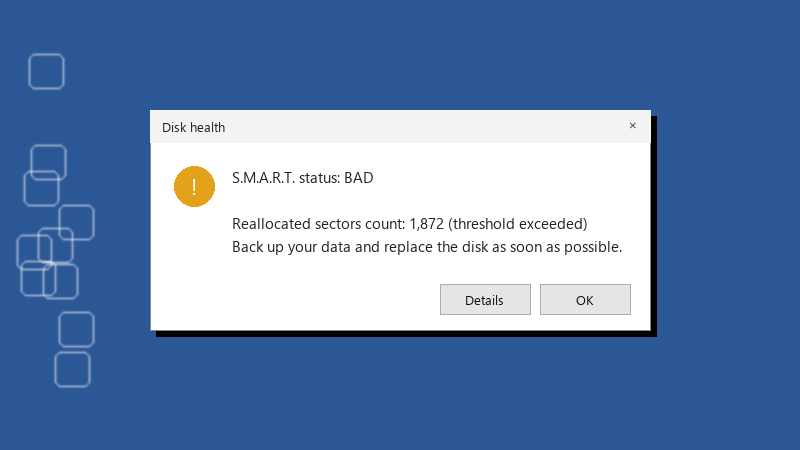
    Disk health

    Disk health
    S.M.A.R.T. status: BAD
    
    Reallocated sectors count: 1,872 (threshold exceeded)
    Back up your data and replace the disk as soon as possible.
    

    The Available Spare value is flagged and the status says Caution instead of Good. Nothing feels slow yet, no file errors 馃憤 But all my projects live on that drive now. Do I demand a refund, keep it as a scratch disk, or am I panicking over a number that does not mean much?


    2
  2. ok but did the seller list the drive's power-on hours or total data written anywhere in the listing? ??

    thinking

    3 0 helpful
  3. @jvarga_25 did u ever fix it?? ??

    3 0 helpful
  4. lol same thing happened to me same issue here on my moms pc... glad im not the only one... lol this thread is gold

    lol

    12 2 helpful
  5. Also update the drive firmware with the vendors SSD tool if the brand has one. Some health warnings are firmware reporting bugs, but only trust that explanation if the vendor actually documents it.

    5 0 helpful
  6. screenshot the SMART data now and send it to the seller with the purchase date. A warning within teh return period is teh easiest refund you will ever get... waiting only weakens ur position. hope that helps :)

    10 0 helpful
  7. ahh classic whatever you decide, set up a real backup today. A second drive with a scheduled copy, or File History, or robocopy /MIR in a scheduled task. A cheap drive is fine if losing it costs you nothing.

    thumbsup

    2 0 helpful

Reply to this topic

Sign in or create an account to reply.

