
Monday 8am, Patched Physical Server, Kernel PANIC 😭

Solvedbootkernellinux13 replies · 295 views · started

Accepted solution

by Zora VanceJump to the reply

oh ive been there lol check /boot space: df -h /boot. If its full, remove old kernels (sudo apt autoremove --purge or sudo dnf remove --oldinstallonly), then reinstall the new kernel package so its initramfs is generated properly, and run update-grub or grub2-mkconfig -o /boot/grub2/grub.cfg.

  1. help!! home lab drama. rocky Linux on my physical srever got a kernel update and now it panics during boot:
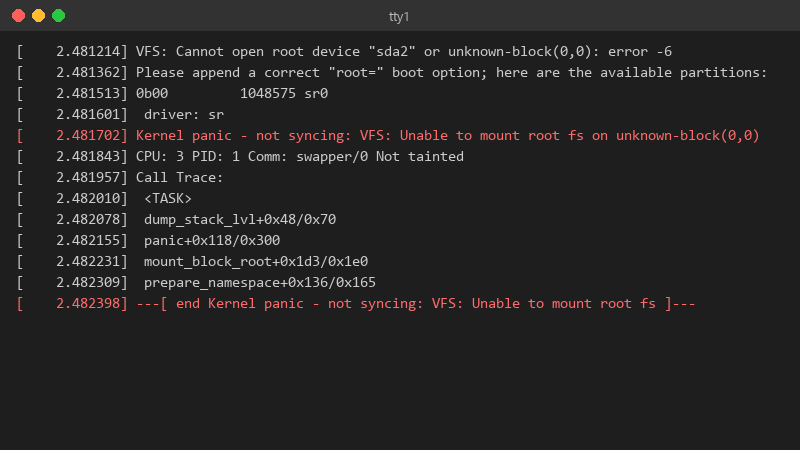
    2.481214 VFS: Cannot open root device "sda2" or unknown-block(0,0): error -6

    [    2.481214] VFS: Cannot open root device "sda2" or unknown-block(0,0): error -6
    [    2.481362] Please append a correct "root=" boot option; here are the available partitions:
    [    2.481513] 0b00         1048575 sr0
    [    2.481601]  driver: sr
    [    2.481702] Kernel panic - not syncing: VFS: Unable to mount root fs on unknown-block(0,0)
    [    2.481843] CPU: 3 PID: 1 Comm: swapper/0 Not tainted
    [    2.481957] Call Trace:
    [    2.482010]  <TASK>
    [    2.482078]  dump_stack_lvl+0x48/0x70
    [    2.482155]  panic+0x118/0x300
    [    2.482231]  mount_block_root+0x1d3/0x1e0
    [    2.482309]  prepare_namespace+0x136/0x165
    [    2.482398] ---[ end Kernel panic - not syncing: VFS: Unable to mount root fs ]---
    

    it was running for months without a hiccup. is this hardware failing at teh worst possible time, or the update?

    I haven't touched the hardware in months. No new disks, no new RAM, nothing. It's just the update and a reboot. I'd like to fix this properly instead of reinstalling, because there's quite a bit of config on this box. pls help 🙏

    4
  2. Does teh previous kernel from the GRUB menu still boot? ??

    7 0 helpful
  3. ok but is kernel even worth bothering with or should i just leave it ?

    5 6 helpful
  4. hmmmm quick q any update on this?? ??

    1 0 helpful
  5. yeah so last line is Kernel panic - not syncing: VFS: Unable to mount root fs on unknown-block(0,0). sorry for the wall of text lol

    1 2 helpful
  6. lol same thing happened to me to rule out hardware, check whether the old kernel is stable over time and run smartctl -a on the disks. A failing disk tends to show i/O errors in dmesg well before a panic.

    2 0 helpful
  7. been there man first, boot teh previous kernel. in GRUB pick 'Advanced options' (Debian/Ubuntu) or teh older entry in teh list (RHEL family). if teh old krenel boots, ur data is fine and the problem is teh new kernel or its initramfs.

    1 0 helpful
  8. VFS: Unable to mount root fs on unknown-block almost always means teh initramfs for the new kernel is missing or incomplete (often because /boot was full during the update). from teh old kernel, rebuild it: sudo update-initramfs -u -k all on Debian/Ubuntu or sudo dracut -f --regenerate-all on RHEL/Fedora. lmk how it goes

    6 0 helpful
  9. ok so after ure up on teh old kernel, read the failed boots log if it got that far: journalctl -b -1 -k (requires persistent journal). Also set the known-good kernel as default temporarily with grub-set-default or grubby --set-default until the new one is fixed.

    thinking

    11 0 helpful
  10. Accepted solution

    oh ive been there lol check /boot space: df -h /boot. If its full, remove old kernels (sudo apt autoremove --purge or sudo dnf remove --oldinstallonly), then reinstall the new kernel package so its initramfs is generated properly, and run update-grub or grub2-mkconfig -o /boot/grub2/grub.cfg.

    4 6 helpful
  11. @lambda_rider omg finally a DKMS module hadn't been built for the new kernel. dkms autoinstall fixed it and the physiacl server is back. owe u a beer 🍺

    3 0 helpful

Reply to this topic

Sign in or create an account to reply.

