My Used 2TB SATA SSD Already Throws A SMART Warning. Bargain Or Ticking Bomb??

Solvedrefurbishedsmartssd4 replies · 259 views · started
Accepted solution by Luca Ueda — hmmm get the full picture with smartctl a /dev/nvme0 (smartmontools works on Windows too) and look at Percentage Used, Available Spare,…
  1. not gonna lie this is driving me nuts confession: I chose the used 2TB SATA SSD to save money for a better GPU. After a month I ran a SMART check because a friend told me to.
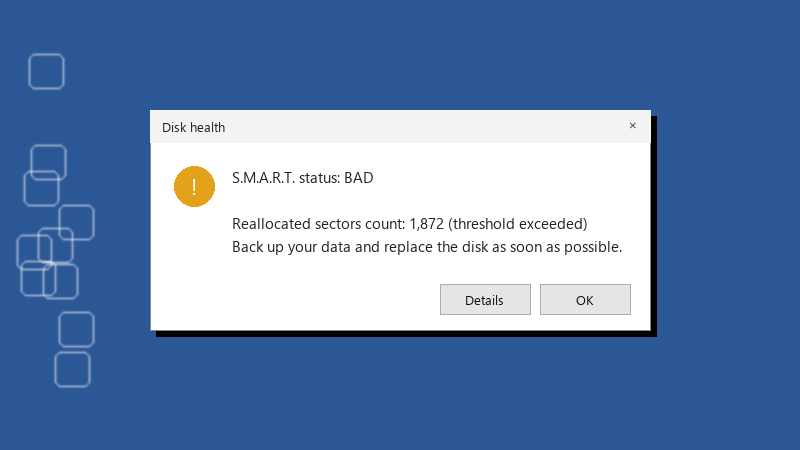
    Disk health

    Disk health
    S.M.A.R.T. status: BAD
    
    Reallocated sectors count: 1,872 (threshold exceeded)
    Back up your data and replace the disk as soon as possible.
    

    the Percentage Used line is yellow. the seller says refurbished drives are fully tested. i am now wondering what exactly they tested. is this a normal state for a second hand SSD or a warning that it is near the end? thx in advance!!

    4
  2. lol same thing happened to me whatever u decide, set up a real backup today. A second drive with a scheduled copy, or File History, or robocopy /MIR in a scheduled task. A cheap drive is fine if losing it costs you nothing. worked for me anyway 🤷

    0 3 helpful
  3. Accepted solution

    hmmm get the full picture with smartctl -a /dev/nvme0 (smartmontools works on Windows too) and look at Percentage Used, Available Spare, Media and Data Integrity Errors and Data Units Written lmao one yellow attribute means very different things depending on which one it is.

    0 9 helpful
  4. respectfully disagree, i tried that and it made smart worse

    0 7 helpful
  5. @luca.ueda wowww ok took the partial refund, the drive is now a scratch disk, and i finally have proper backups. exepnsive lesson, cheap drive. owe u a beer 🍺

    2 0 helpful

Reply to this topic

Sign in or create an account to reply.