Codec trouble with OBS recordings. Any lasting fix? 🤔

Solvedcodecimportvideo-editing8 replies · 124 views · started
Accepted solution by Eamon Ivanova — oh ive been there lol MKV support in Resolve is limited depending on version, so if ur OBS recordings are MKV, remux to MP4 without re…
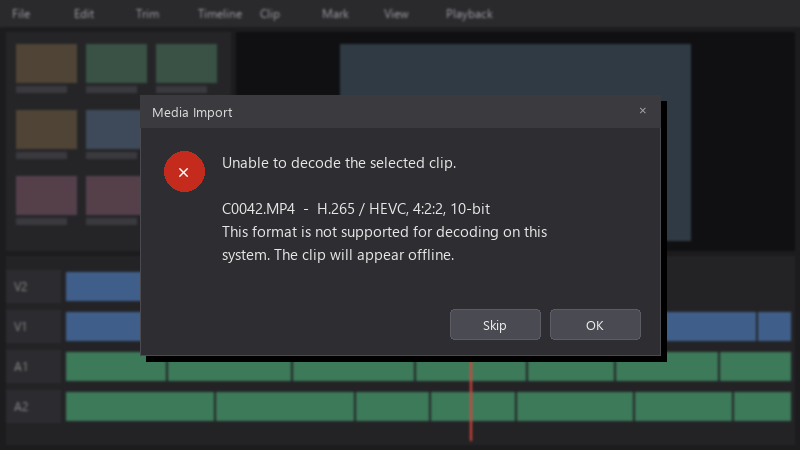
  1. hmmmm ok I'm brand new to editing and tried importing OBS recordings into my editor... result: no video, only audio:
    Media Import

    Media Import
    Unable to decode the selected clip.
    
    C0042.MP4  -  H.265 / HEVC, 4:2:2, 10-bit
    This format is not supported for decoding on this
    system. The clip will appear offline.
    

    The files play fine in my media player. I don't understand why the editor can't read them. What do I need to install or change?

    I've tried restarting the editor and importing the files one by one. Nothing changes. I'd love to understand why the editor and the media player disagree. thx in advance for any help with this.


    23
  2. oh ive been there lol phone footage is often variable frame rate... trnascoding to constant frame rate also prevents audio sync drift later. good luck man!

    0 6 helpful
  3. make a backup before u touch the update, learned that the hard way

    12 0 helpful
  4. hmmm same issue here on my homelab box, no idea whats going on lmk how it goes

    1 0 helpful
  5. been there man the free version of Resolve on Windows has limited H.264/H.265 support for certain profiles, especially 10-bit 4:2:2. resolve on Linux doesnt support H.264/AAC in teh free version at all, check what your version supports before assuming teh files are broken. hope that helps :)

    0 2 helpful
  6. hmmm wait does this also apply to video,?, i swear recordings is cursed ?

    2 0 helpful
  7. Accepted solution

    oh ive been there lol MKV support in Resolve is limited depending on version, so if ur OBS recordings are MKV, remux to MP4 without re-encoding using FFmpeg: ffmpeg -i input.mkv -c copy output.mp4. It's lossless and takes seconds (OBS can also do it via File > Remux Recordings). remuxing wont help with the HEVC 4:2:2 10-bit clip in ur screenshot tho, the free version cant decode that, so either use Studio or transcode to an intermediate like DNxHR/ProRes. lmk how it goes

    3 4 helpful
  8. @eivanova Changed the recording settings so future files work right away, and converted the old ones. No more codec errors. owe u a beer 🍺

    1 0 helpful

Reply to this topic

Sign in or create an account to reply.