
Separate Audio Recorder Vs Camera: Drift After 30 Minutes

audio-syncframe-ratevideo-editing8 replies 路 294 views 路 started
  1. this drift is ruining my project... a gameplay capture, 30 minutes in, and voices are clearly out of sync:
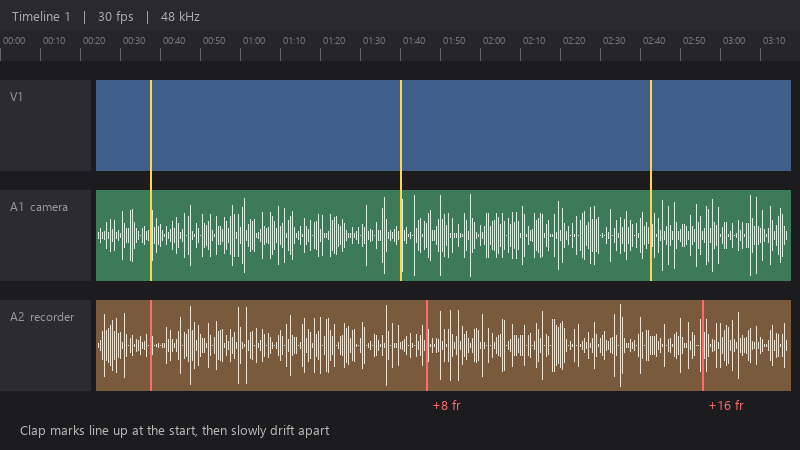
    Timeline 1 | 30 fps | 48 kHz

    Timeline 1   |   30 fps   |   48 kHz
    A1  camera
    A2  recorder   +8 fr   +16 fr
    Clap marks line up at the start, then slowly drift apart
    

    i used teh free Resolve version. is it the recording, the settings, or the software?

    id like to fix this at the source, so future recordings dont have teh same problem 馃う any advice on settings is appreciated. any help to stop teh endless manual nudging is welcome.

    7
  2. hmmmm quick q what does media info say about the frame rate mode: constant or variable? ??

    0 3 helpful
  3. ok so for long recodrings, check teh audio samlpe rate in the clip attributes. A 44.1 kHz file interpreted as 48 kHz will drift steadily. worked for me anyway 馃し

    0 4 helpful
  4. ok so in screen recording software like OBS, set a constant frame rate and match teh audio sample rate (48 kHz) to the project... mismatched sample rates can also cause drift. hope that helps :)

    0 12 helpful
  5. @stack_forge252 did u ever fix it? ??

    7 2 helpful
  6. for separate audio recorders, drift comes from clock differences between devices. sync at the start, then check the end and adjust audio speed slightly with Change Clip Speed until teh end lines up too. hope that helps :)

    39 6 helpful
  7. @urahman wowww ok converted to constant frame rate and the drift is completely gone... the whole 30 minutes stays in sync... thank you! seriously made my day 馃槶馃檹

    thumbsup

    0 1 helpful

Reply to this topic

Sign in or create an account to reply.

