UNCORRECTABLE SECTOR COUNT KEEPS GROWING. WHAT DOES IT ACTUALLY MEAN?

Solvedbackuphard-drivesmart4 replies · 89 views · started

Accepted solution

by Nina KochJump to the reply

Back up first, diagnose second. Copy the most important files to another drive before running any long tests, because heavy reads can push a failing drive over the edge. lmk how it goes

  1. guys pls help got this today:
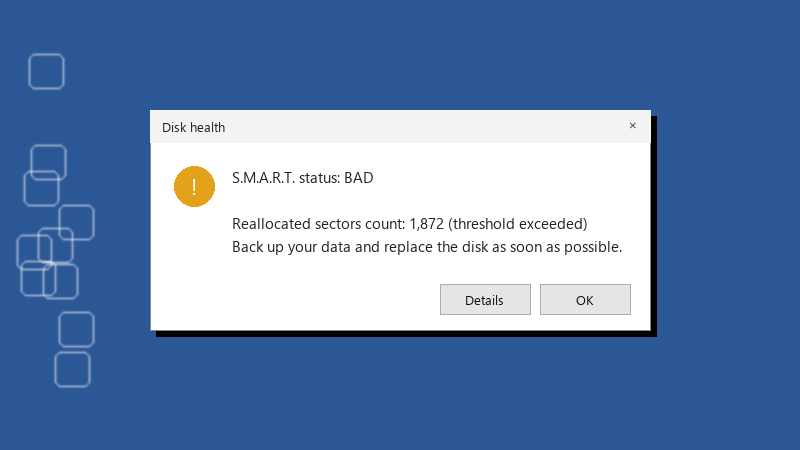
    Disk health

    Disk health
    S.M.A.R.T. status: BAD
    
    Reallocated sectors count: 1,872 (threshold exceeded)
    Back up your data and replace the disk as soon as possible.
    

    the old boot SSD holds a lot of my backups and this is the first SMART warning Ive ever seen. uncorrectable Sector Count went from zero to a small number. should i replace it right away, or is it normal for a few sectors to go bad?? ive read conflicting advice, so Id like to hear from ppl who actually watched a drive with a warning like this. did it fail fast, or did it last for years?

    2
  2. been there man on Linux or with smartmontools on Windows, run:

    smartctl -a /dev/sda
    smartctl -t long /dev/sda
    

    check the result later with smartctl -l selftest /dev/sda.

    0 6 helpful
  3. Accepted solution

    Back up first, diagnose second. Copy the most important files to another drive before running any long tests, because heavy reads can push a failing drive over the edge. lmk how it goes

    0 2 helpful
  4. hmmmm quick q wait does this also apply to smart?. my brand new build is officially haunted ??

    0 0 helpful
  5. @nina.koch omg finally uncorrectable Sector Count stayed flat for a month after the backup. Im keeping the drive for non-critical stuff and checking SMART monthly.

    1 0 helpful

Reply to this topic

Sign in or create an account to reply.