
deleted node_modules three times. module not found: can't resolve 'fs' is still there

Solvedbuildjavascriptnpm10 replies · 264 views · started
Accepted solution by Anika A. — pin teh Node version, add an .nvmrc or teh engines field in package.json, and make CI use the same major version. Compare node v and npm v…
  1. so annoyed rn merged a dependency update PR and now webpack refuses to build:
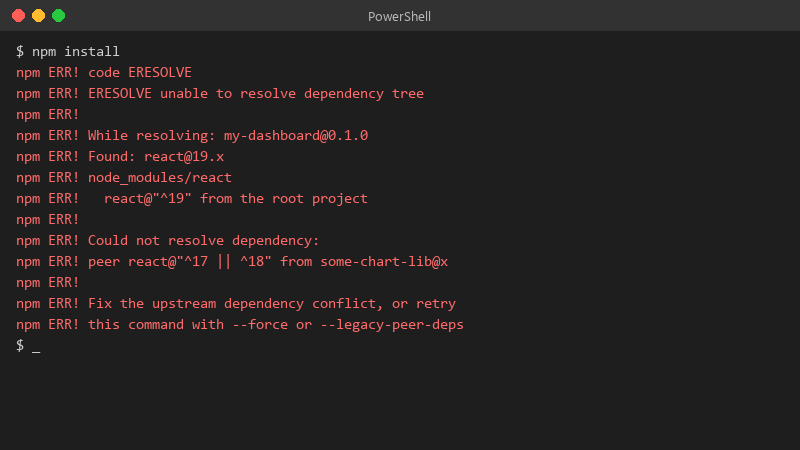
    $ npm install

    $ npm install
    npm ERR! code ERESOLVE
    npm ERR! ERESOLVE unable to resolve dependency tree
    npm ERR!
    npm ERR! While resolving: my-dashboard@0.1.0
    npm ERR! Found: react@19.x
    npm ERR! node_modules/react
    npm ERR!   react@"^19" from the root project
    npm ERR!
    npm ERR! Could not resolve dependency:
    npm ERR! peer react@"^17 || ^18" from some-chart-lib@x
    npm ERR!
    npm ERR! Fix the upstream dependency conflict, or retry
    npm ERR! this command with --force or --legacy-peer-deps
    

    the error is Module not found: Cant resolve fs. the PR looked harmless, a few version bumps. id rather understand the cause than blindly revert or slap a flag on it 😤 whats the right way to read this error and fix it properly? happy to share more of the log if someone tells me which lines matter. any ideas??


    40
  2. Are Node and npm the same versions locally and in CI?

    3 1 helpful
  3. +1 same here. honestly just reset the update and save yourself the pain

    1 6 helpful
  4. hmmm which version are you on?

    17 0 helpful
  5. For JavaScript heap out of memory, raise the limit for teh build: NODE_OPTIONS=--max-old-space-size=4096 npm run build. If it keeps growing, look for huge source maps, giant JSON imports or an accidental import of a whole library. lmk how it goes

    9 4 helpful
  6. oh ive been there lol Can't resolve 'fs' means code meant for Node ended up in teh browser bundle. webpack 5 and Vite dont polyfill Node core modules... find which import pulls it in (often a server-only helper imported from a shared file) and keep it on the server side. hope that helps :)

    37 2 helpful
  7. ok so commit your lockfile and use npm ci in CI. It installs exactly what the lockfile says and fails if package.json and the lockfile disagree, which surfaecs drift early instead of resolving different versions on different machines.

    3 0 helpful
  8. Accepted solution

    pin teh Node version, add an .nvmrc or teh engines field in package.json, and make CI use the same major version. Compare node -v and npm -v locally and in CI; many nothing changed failures are actually a new Node version on the runner. fingers crossed 🤞

    lol

    0 6 helpful
  9. nah tbh id honestly just use --legacy-peer-deps temporarily if teh app works fine. Waiting for a plugin author to upadte their peer range can take months. but hey ymmv

    11 0 helpful
  10. @copperbench holy cow moved teh server-only import out of teh shared file and teh build passes. Makes total sense now that I understand the error.

    0 2 helpful

Reply to this topic

Sign in or create an account to reply.

