Is a SMART warning on a marketplace 1TB SATA SSD grounds for a refund??

Solvedrefurbishedsmartssd17 replies · 437 views · started
Accepted solution by Zane Kaur — also update teh drive firmware with the vendors SSD tool if the brand has one. some health warnings are firmware reporting bugs, but only…
  1. i got clever and bouhgt a marketplace 1TB SATA SSD insetad of a new one xD felt great for a month... then i installed a health tool out of curiosity and it greeted me with this.
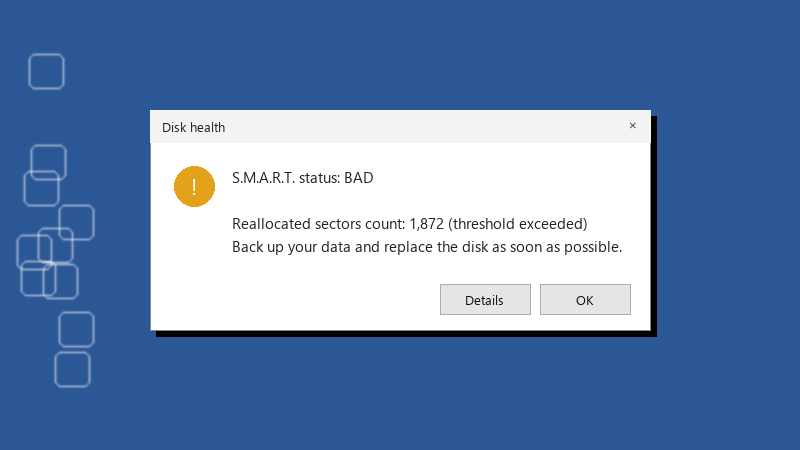
    Disk health

    Disk health
    S.M.A.R.T. status: BAD
    
    Reallocated sectors count: 1,872 (threshold exceeded)
    Back up your data and replace the disk as soon as possible.
    

    the Reallocated Sectors value is flagged and the status says Caution instead of Good. nothing feels slow yet, no file errors. but all my projects live on that drive now 🔥 do I demand a refund, keep it as a scratch disk, or am I panikcing over a number that does not mean much?


    rage

    1
  2. ok but is it teh boot drive, or just storage? that changes how urgent this is.

    2 0 helpful
  3. been there man came here to say exactly this

    2 0 helpful
  4. hmmm which version are you on?. this 🔥 so much this

    0 3 helpful
  5. sorry forgot to say seller replied and offered a partial refund if I keep it, or a full refund if I send teh marketplace 1TB SATA SSD back.

    26 1 helpful
  6. oh ive been there lol +1 same here

    9 2 helpful
  7. yeahhh screenshot teh SMART data now and send it to the seller with the purchase date. A warning within the return period is the easiest refund u will ever get. waiting only weakens your position. fingers crossed 🤞

    20 0 helpful
  8. lol same thing happened to me refurbished SSDs with high Percentage Used are simply worn, not broken. If it is past 100 percent, the manufacturer's endurance rtaing is used up. It can still work for a long time, but it should never hold your only copy of anything.

    21 4 helpful
  9. oof whatever you decide, set up a real backup today. A second drive with a scheduled copy, or File History, or robocopy /MIR in a scheduled task. A cheap drive is fine if losing it costs you nothing.

    3 0 helpful
  10. lol same thing happened to me if Media and Data Integrity Errors or reallocated sectors are above zero and rising, treat it as failing lmao run teh check again in a few days. A stable number is a scar, a climbing number is a countdown. worked for me anyway 🤷

    2 0 helpful
  11. Get the full picture with smartctl -a /dev/sda (smartmontools works on Windows too) and look at the reallocated, pending and uncorrectable sector counts, the wear/lifetime-used attribute and total writes (on an NVMe drive its Percentage Used, Available Spare and Media and Data Integrity Errors instead)... one yellow attribute means very different things depending on which one it is.

    10 0 helpful
  12. Accepted solution

    also update teh drive firmware with the vendors SSD tool if the brand has one. some health warnings are firmware reporting bugs, but only trust that explanation if teh vendor actually documents it.

    0 5 helpful
  13. hmmmm not sure about that respectfully disagree, i tried that and it made marketplace worse idk maybe im wrong lol

    0 1 helpful
  14. @zane.kaur dude number stayed stable for two weeks, so the mraketplace 1TB SATA SSD is now my game library drive only. Projects moved to a new SSD with a nightly backup. u guys are the best!!!

    4 11 helpful

Reply to this topic

Sign in or create an account to reply.