How Do You Troubleshoot Online Play With Friends On A Original Switch? ugh

Solvednetworkonlineswitch18 replies · 340 views · started
Accepted solution by Gabe Becker — ok so in teh connection settings for your network, you can try changing the MTU value to 1500 in Change Settings MTU . It fixes some…
  1. not gonna lie this is driving me nuts my original Switch used to connect to online play with friends fine. now:
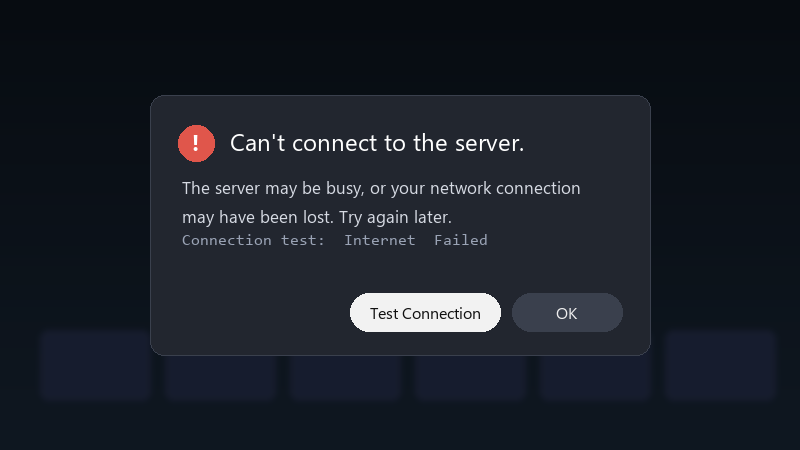
    Can't connect to the server.

    Can't connect to the server.
    The server may be busy, or your network connection
    may have been lost. Try again later.
    Connection test:  Internet  Failed
    

    Nothing chanegd on my side as far as i know, except maybe a ruoter update. Im on home Wi-Fi. Where do people usually start?

    im happy to try settings changes and report back.. :D i just wanna be able to play online again without restarting everything every time.

    Game night is in two days, and i really dont want to be teh one who cant join ;) Any ideas are welcome, even basic ones. any ideas??

    facepalm

    2
  2. run System Settings > Internet > Test Connection and check the NAT type :) NAT type A or B is usually fine for most games. C, D or F can cause exactly this.

    0 2 helpful
  3. @polar_otter thank u this worked!! u guys are the best!!!

    2 1 helpful
  4. ahh classic check teh official network status page for maintenance or outages. if a service is down, the console shows a generic error that looks like a local problem.

    reading release notes like its a horror novel

    0 0 helpful
  5. oof on hotspots and shared networks, connection problems are common, if you can, test on a home network to check that teh console itself is fine.

    0 2 helpful
  6. yeahhh restart teh router and console fully: turn the console off with Power Options > Turn Off, not sleep, then turn it back on. good luck man!

    3 6 helpful
  7. help!! my laptop is officially haunted pls help 🙏

    1 10 helpful
  8. hmmm enable UPnP on teh router if its off, it lets the console open the ports it needs and often improves the NAT type.

    thumbsup

    6 6 helpful
  9. bump. still happening with online for me. @vectornomad did u ever fix it? good luck man!

    4 0 helpful
  10. make a backup before u touch teh firmware, learned that teh hard way

    3 2 helpful
  11. ok so in teh connection settings for your network, you can try changing the MTU value to 1500 in Change Settings > MTU. It fixes some connection issues with certain routers.

    0 3 helpful
  12. wait what id avoid putting the console in the routers DMZ unless you really know what ure doing. UPnP is safer. just my 2 cents

    0 1 helpful
  13. @gbecker Enabled UPnP on teh router and my NAT is B now. Now online play with friends works on my original Switch. Thanks!

    1 3 helpful

Reply to this topic

Sign in or create an account to reply.

