Drift Problem: The Cursor Never Stops Moving And It's Driving Me Mad

Solvedcontrollerdriftdualsense5 replies · 123 views · started
Accepted solution by Yara Stone — ok so on a PC you can check teh raw values in Steams controller settings or in Windows game controller settings... that way u can show…
  1. my limited-edition DualSense is about about eighteen months old and now teh cursor never stops moving. i made a quick test screen to check, and this is what teh left stick does when Im not even touching it:
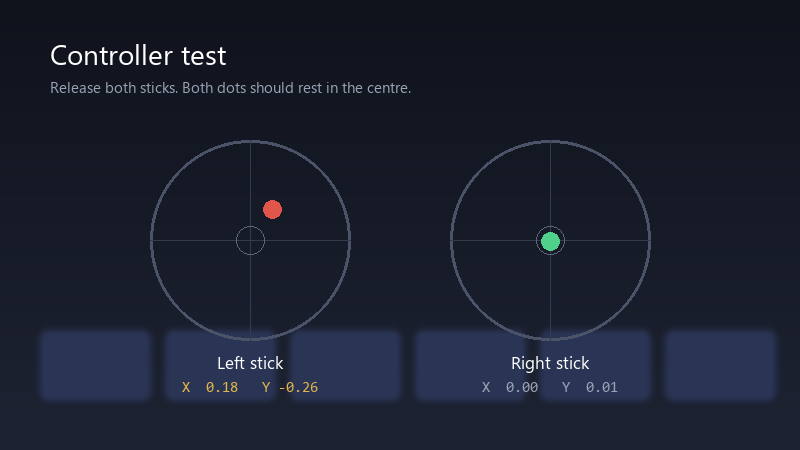
    Controller test

    Controller test
    Release both sticks. Both dots should rest in the centre.
    Left stick    X  0.18   Y -0.26
    Right stick   X  0.00   Y  0.01
    

    Its not huge, but in shooters its enough to throw off my aim, and in menus its maddening 🤦 Ive tried blowing into it, which i know is not ideal. Is drift fixable, or is it time for a new controller? pls help 🙏


    8
  2. does the drift show up in every game, or just some? ??

    2 0 helpful
  3. been there man update the controller first: on teh console go to Settings > Accessories > Controllers (General) > Wireless Controller Device Software with the controller connecetd by USB. firmware wont fix worn hardware, but it rules out software.

    1 0 helpful
  4. Accepted solution

    ok so on a PC you can check teh raw values in Steams controller settings or in Windows game controller settings... that way u can show exact numbers instead of it feels off. fingers crossed 🤞

    2 3 helpful
  5. @voxelshed Sent it in under warranty with the test video and got a replacement limited-edition DualSense. Painless. Thanks for the tip about recording it.

    6 0 helpful

Reply to this topic

Sign in or create an account to reply.