is a high-res texture pack on my 6 gb rtx 2060 asking for trouble??

Solvedcrashdirectxvram6 replies · 213 views · started
Accepted solution by Lea Q. — ok so watch real usage with an overlay or in Task Managers Performance GPU tab under Dedicated GPU memory ... if it sits right at the…
  1. ugh. i was playing a heavily modded RPG on my 6 GB RTX 2060 with a high-res txeture pack, and after about half an hour it crashed with this:
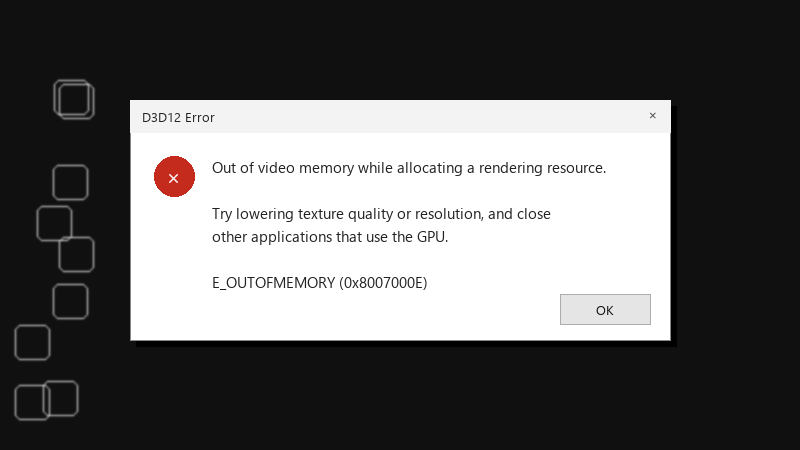
    D3D12 Error

    D3D12 Error
    Out of video memory while allocating a rendering resource.
    
    Try lowering texture quality or resolution, and close
    other applications that use the GPU.
    
    E_OUTOFMEMORY (0x8007000E)
    

    The frame rate was fine right until the crash. I thought my card was decent, but now I'm wondering if it just doesn't have enough VRAM for newer games ;) Which settings should I lower first without making the game look terrible?

    I'd rather not drop everything to low if there's a smarter way. I'm happy to experiment with settings one at a time and report back with what helps.

    3
  2. hmmm close browsers and apps that use hardware acceleration while gaming. they can take a surprising amount of VRAM in the background.

    2 0 helpful
  3. guys pls help my office machine is officially haunted

    DNS. its always DNS

    rage

    6 1 helpful
  4. @liv.grant nah thats not it, vram has nothing to do with it 🔥 for me it was the defalut config. swapped it and boom, fixed

    5 0 helpful
  5. Accepted solution

    ok so watch real usage with an overlay or in Task Managers Performance > GPU tab under Dedicated GPU memory... if it sits right at the limit, ure running out.

    0 5 helpful
  6. @leaq123 turned out the laptop was using teh integrated GPU for part of the game. forced high performance and its fine now. thx!

    1 0 helpful

Reply to this topic

Sign in or create an account to reply.
