WHY DOES A RACING GAME NEED MORE THAN THE GAME ITSELF OF SHADER CACHE?

Solvedshader-cachesteam-deckstorage7 replies · 319 views · started
Accepted solution by Sami Jensen — ok so if youre often short on space, the internal SSD can be upgraded, but it requires opening the device and reinstalling SteamOS. Read…
  1. Help me understand this. I tried to install a new game on my second-hand Steam Deck:
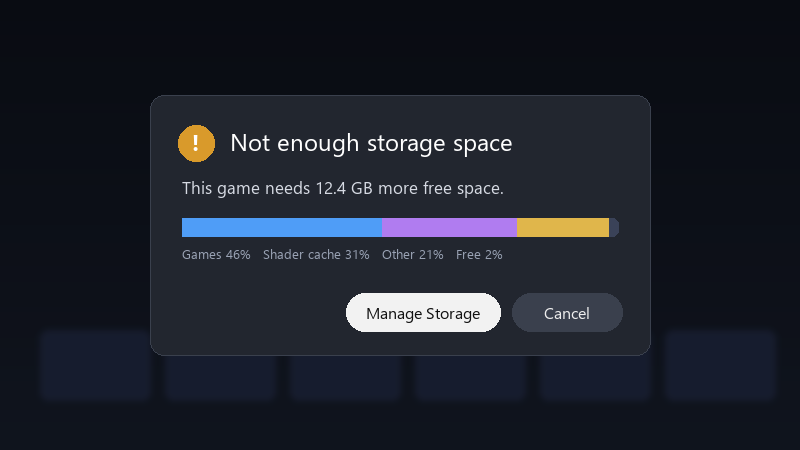
    Not enough storage space

    Not enough storage space
    This game needs 12.4 GB more free space.
    Games 46%   Shader cache 31%   Other 21%   Free 2%
    

    the storage screen shows shader cache using more than the game itself. my games are mostly on the SD card, but teh cache seems to be on internal storage. is there a way to manage it, or move it?

    id also like to understand whether this will keep happening ;) if i clear it today, will it just fill up again next week? any ideas??

    3
  2. by default, shader cache and Proton data for games on the SD card are stored on the internal drive. thats why internal storage fills up even when games are on the card. lmk how it goes

    windows update said 'this will only take a moment' 3 hours ago

    3 5 helpful
  3. @sami_polar nah thats not it, storage has nothing to do with it but hey ymmv

    2 0 helpful
  4. Shader cache is safe to dleete. The game rebuilds it when needed, which may mean some extra stutter or loading the first time. Settings > Storage shows how much space each game uses, which helps u spot the worst offenders.

    2 0 helpful
  5. ok so if youre often short on space, the internal SSD can be upgraded, but it requires opening the device and reinstalling SteamOS. Read teh official guide carefully first. worked for me anyway 🤷

    0 5 helpful
  6. @sami_polar yesss turned off shader pre-caching and cleared some old folders. plenty of space now, and stutter isnt bad.

    0 0 helpful

Reply to this topic

Sign in or create an account to reply.
