is it normal for shader cache to grow to over 10 gb??

Solvedshader-cachesteam-deckstorage6 replies · 220 views · started
Accepted solution by Alba W. — lol same thing happened to me by default, shader cache and Proton data for games on the SD card are stored on teh internal drive. that's…
  1. hmmmm ok i'm new to the second-hand Steam Deck, and i'm confused 😭 The storage screen shows a lot of shader cache:
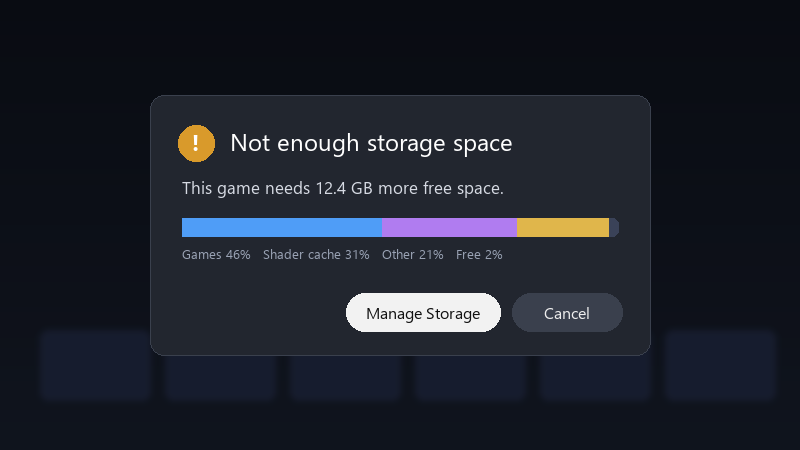
    Not enough storage space

    Not enough storage space
    This game needs 12.4 GB more free space.
    Games 46%   Shader cache 31%   Other 21%   Free 2%
    

    most of it is from a huge RPG. is this normal? is there something i should change in teh settings??

    Any tips for maanging storage on a small model are welcome :D i didn't expect this to be teh main thing i'd fight with.

    im not a Linux expert, so pls explain like Im five if it involves Desktop Mode :D I just want to play without constantly dleeting things. seriously need help here 😭


    0
  2. uhh are most games installed on the SD card or internal storage?

    it works on my machine™

    2 1 helpful
  3. ok but wait does this also apply to shader-cache??

    20 0 helpful
  4. yeahhh shader cache is safe to delete. the game rebuilds it when needed, which may mean some extra stutter or loading the first time. Settings > Storage shows how much space each game uses, which helps you spot the worst offenders.

    6 0 helpful
  5. Accepted solution

    lol same thing happened to me by default, shader cache and Proton data for games on the SD card are stored on teh internal drive. that's why internal storage fills up even when games are on the card.

    1 4 helpful
  6. @polarloop yesss deleted cache for uninstalled games and freed over 10 GB. My second-hand Steam Deck breathes again. Thanks! seriously made my day 😭🙏

    17 0 helpful

Reply to this topic

Sign in or create an account to reply.
