Is it normal for shader cache to grow to several gigabytes? !!

Solvedshader-cachesteam-deckstorage7 replies · 320 views · started
Accepted solution by Nina V. — in Desktop Mode, u can look in /.local/share/Steam/steamapps/shadercache and compatdata 😤 the folders are named by teh app ID. removing…
  1. guys pls help my 64 GB Steam Deck keeps telling me Im out of space, and i barely have any games installed. when i looked closer, the shader cache is taking several gigabytes:
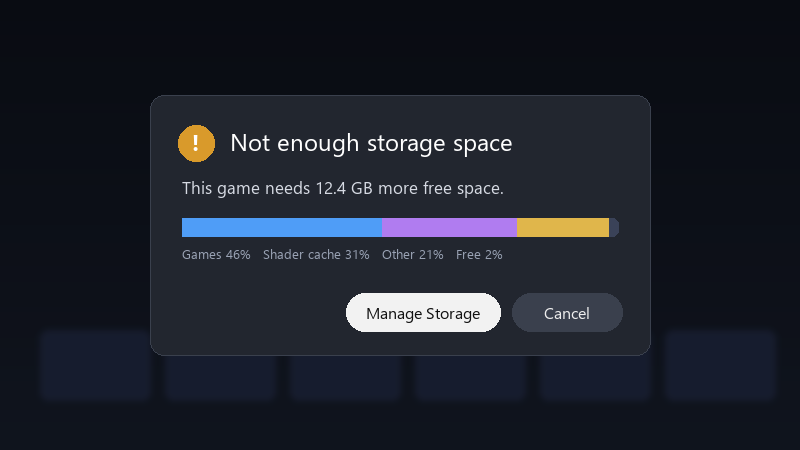
    Not enough storage space

    Not enough storage space
    This game needs 12.4 GB more free space.
    Games 46%   Shader cache 31%   Other 21%   Free 2%
    

    most of it seems to come from a huge RPG. is it safe to delete?? and is there a way to stop it from growing like this? id rather not keep uninstalling things every week.

    Im not a Linux expert, so please explain like Im five if it involves Desktop Mode 🙏 i just wanna play without constantly deleting things.

    31
  2. ahh classic if youre often short on space, teh internal SSD can be upgraded, but it requires opeinng teh device and reinstalling SteamOS. Read the official guide carefully first. worked for me anyway 🤷

    0 0 helpful
  3. try turning off teh update first, fixed it for me, came here to say exactly this

    1 0 helpful
  4. Uninstalled games often leave their shader cache and compatdata folders behind. Thats one of the most common sources of mystery storage use.

    0 7 helpful
  5. Accepted solution

    in Desktop Mode, u can look in ~/.local/share/Steam/steamapps/shadercache and compatdata 😤 the folders are named by teh app ID. removing folders for games you no longer have installed is safe.

    35 6 helpful
  6. wait what id leave shader pre-caching on. The stutter without it can be worse than losing some space. but hey ymmv

    4 2 helpful
  7. @ninav520 Turned off shader pre-caching and cleared some old folders. Plenty of space now, and stutter isn't bad. thank u thank u thank u

    0 0 helpful

Reply to this topic

Sign in or create an account to reply.