Joy-Con Drift: What Really Works Before Buying New Ones?

Solveddriftjoy-conswitch17 replies · 249 views · started
Accepted solution by Mila Tanaka — ahh classic on a Switch Lite the sticks are built in, so a DIY fix means opening the whole console. that's a strong reason to go through…
  1. ok so im playing an open-world adventure on my Switch Lite and the left stick has started drifting, menus scroll on their own, and in-game my character slowly wanders off. i ran a stick test with my hands off and its clealry not centred:
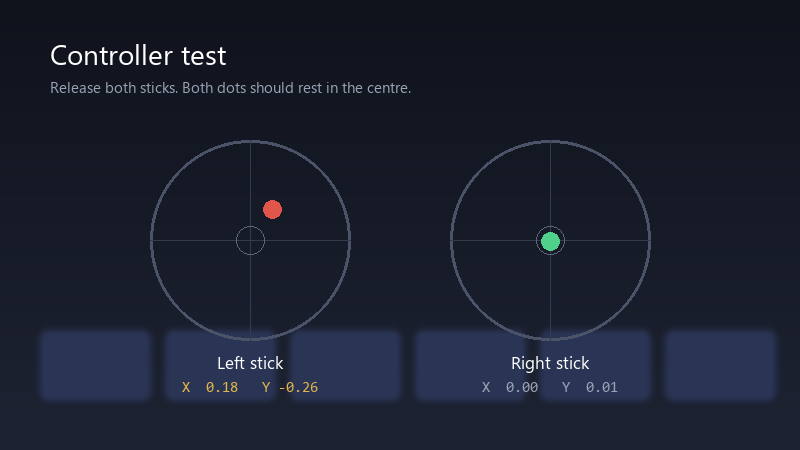
    Controller test

    Controller test
    Release both sticks. Both dots should rest in the centre.
    Left stick    X  0.18   Y -0.26
    Right stick   X  0.00   Y  0.01
    

    ive had these controllers for a while, but Im careful with them, is calibration enough, or is this the infamous drift everyone talks about?

    Id really rather not keep buying new controllers. If theres something that actually lasts, Im all ears. pls help 🙏

    0
  2. Did calibration show teh stick returning to the centre after you release it??

    3 0 helpful
  3. If you're comfortable with DIY, replacement stick modules exist, but opening a Joy-Con involves small ribbon cables and tri-wing screws. It's easy to make things worse, and it can affect warranty.

    6 6 helpful
  4. wowww ok finally got it working, thanks everyone u guys are the best!!!

    0 3 helpful
  5. Contact officail repair support. Joy-Con drift is a well-known issue, and repair options exist in many rgeions. Check what applies where you live before paying for anything. fingers crossed 🤞

    0 1 helpful
  6. been there man this 🔥 so much this. dumb question but how do i even check the settings lmk how it goes

    1 0 helpful
  7. uhh wait does this also apply to switch? ?

    2 2 helpful
  8. oof following, having the same problem. is joy-con even worth btohering with or should i just leave it

    0 0 helpful
  9. Gently rotate the stick in full circles a few times and use short bursts of compressed air around the base. Dust is a common cause of early drift. lmk how it goes

    2 2 helpful
  10. yeahhh update teh controllers in System Settings > Controllers and Sensors > Update Controllers, it takes a few seconds and rules out firmware issues. good luck man!

    7 6 helpful
  11. Start with System Settings > Controllers and Sensors > Calibrate Control Sticks. Follow teh on-screen steps carefully, it fixes mild drift and confirms the stick isnt just mis-calibrated.

    0 0 helpful
  12. Accepted solution

    ahh classic on a Switch Lite the sticks are built in, so a DIY fix means opening the whole console. that's a strong reason to go through official rpeair. good luck man!

    2 13 helpful
  13. have u checked your drift settings? mine were reset after an update hope that helps :)

    0 0 helpful
  14. @cacheowl-3pn wowww ok sent teh Joy-Con in for repair and got it back working perfectly. Much easier than i expected. seriously made my day 😭🙏

    1 0 helpful

Reply to this topic

Sign in or create an account to reply.