
is there any real fix for second-hand dualsense drift, or do i buy another one?

Solvedcontrollerdriftdualsense14 replies · 513 views · started
Accepted solution by Kira O. — yeahhh if its under warranty, contact official support, write down which stick drifts and in which direction, and record a short video of…
  1. my second-hand DualSense is about only six weeks old and now the camera slowly turns on its own... i made a quick test screen to check, and this is what the left stick does when Im not even touching it:
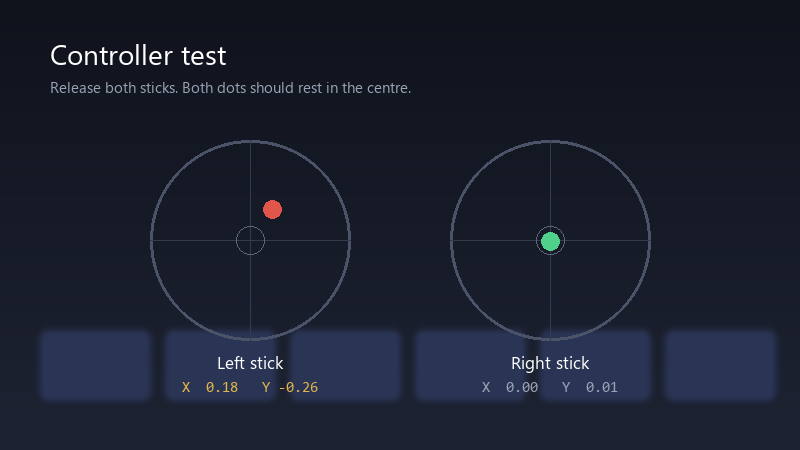
    Controller test

    Controller test
    Release both sticks. Both dots should rest in the centre.
    Left stick    X  0.18   Y -0.26
    Right stick   X  0.00   Y  0.01
    

    it's not huge, but in shooters it's enough to throw off my aim, and in menus it's maddening. I've tried blowing into it, which I know is not ideal. is drift fixable, or is it time for a new controller? seriously need help here 😭

    5
  2. hmmmm quick q does the drift show up in every game, or just some??

    0 0 helpful
  3. On a PC you can check the raw values in Steams controller settings or in Windows game controller settings. That way you can show exact numbers instead of it feels off.

    9 2 helpful
  4. oof reset the controller: theres a tiny reset button in a small hole on the back. Press it with a paperclip for a few seconds, then reconnect with a USB cable and press the PS button. good luck man!

    29 0 helpful
  5. ahh classic same issue here on my homelab box 😂 following this thread

    0 0 helpful
  6. ahh classic try turning off teh cable first, fixed it for me lmk how it goes

    0 0 helpful
  7. been there man light cleaning can help if its dust: short bursts of compressed air around the base of teh stick while rotating it, dont spray liquid into the controller.

    5 1 helpful
  8. ugh. ok this thread just saved my weekend im about to throw this thing out the window lol

    5 0 helpful
  9. wait is drift even worth bothering with or should i just leave it

    5 2 helpful
  10. been there man update the controller first: on the console go to Settings > Accessories > Controllers (General) > Wireless Controller Device Software with the controller connected by USB. firmware wont fix worn hardware, but it rules out software. good luck man!

    1 0 helpful
  11. this. so much this lmk how it goes

    0 0 helpful
  12. Accepted solution

    yeahhh if its under warranty, contact official support, write down which stick drifts and in which direction, and record a short video of a stick test with ur hands off, it makes the process much smoother. lmk how it goes

    2 7 helpful
  13. @kira_rusty holy cow bumped the deadzone in my main game while i wait for the repair. No more drift for now. Good enough for now, thank you.

    3 0 helpful

Reply to this topic

Sign in or create an account to reply.



