The queue says waiting, the router says fine, my PS5 Pro says nothing ugh

Solveddownloadps5rest-mode16 replies · 477 views · started
Accepted solution by Tess H. — hmmm make sure theres enough free space for teh download plus the install. if the console cant reserve the space, some downloads just sit…
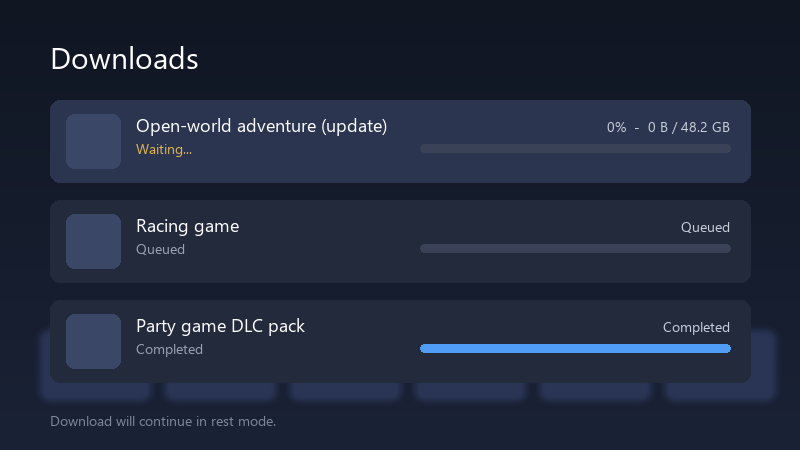
  1. help!! every night i put my PS5 Pro into rest mode with a 40 GB update queued, and every morning i find this:
    Downloads

    Downloads
    Open-world adventure (update)   Waiting...   0%  -  0 B / 48.2 GB
    Racing game   Queued
    Party game DLC pack   Completed
    Download will continue in rest mode.
    

    Still 0%, still "Waiting...". If I turn the console on and stay on the downloads screen, it starts right away, so the internet clearly works. Im on Wi-Fi. I dont get it lmao The whole point of rest mode is that I dont have to babysit it lmao Has anyone figured out what actually makes downloads run overnight?

    4
  2. hmmm what NAT type does the connection test show? ??

    1 0 helpful
  3. reading this at 2am instead of sleeping, no regrets

    3 0 helpful
  4. if ure on a mesh or powerline setup, try a direct cable for one night as a test, rest mode keeps the netwrok on, but it reconnects after the console settles, and some mesh nodes hand it a weak connection.

    2 0 helpful
  5. yeahhh pause teh download, then resume it before ptuting the console to sleep. A download thats stuck in teh queue often stays stuck until its nudged once. lmk how it goes

    38 0 helpful
  6. Run Settings > Network > Connection Status > Test Internet Connection while the download is stuck. If teh test hangs or the NAT type is 3, fix that first. Downloads in rest mode are much less forgiving of a flaky connection. hope that helps :)

    9 0 helpful
  7. hmmm check Settings > System > Power Saving > Features Available in Rest Mode and make sure Stay Connected to the Internet is tunred on. without it teh console really does drop teh network in rest mode.

    1 0 helpful
  8. yeahhh safe Mode Clear Cache and Rebuild Database fixes queues that are stuck in a weird state. it doesnt remove games or saves.

    0 2 helpful
  9. ahh classic pro tip: write down what u change. i didnt and had to redo update from scratch worked for me anyway 🤷

    6 2 helpful
  10. @rowan_polar nah thats not it, rest-mode has nothing to do with it just my 2 cents

    13 0 helpful
  11. Accepted solution

    hmmm make sure theres enough free space for teh download plus the install. if the console cant reserve the space, some downloads just sit at waiting instead of showing an error.

    2 6 helpful
  12. wait what honestly, if your power costs arent an issue, just laeving teh console on the downloads screen is the most reliable option. Rest mode is convenient, but its not perfect.

    2 0 helpful
  13. @rowan.fontaine4 what did u end up doing in the end

    thinking

    17 0 helpful
  14. also lol page 1 lets gooo. for me it was the antivirus. swapped it and boom, fixed

    2 2 helpful
  15. @heaptrace-3nj Pausing and resuming before rest mode did the trick. Weird, but the queue moves now. Thanks! thank u thank u thank u

    my pc fans sound like a jet taking off but sure

    3 0 helpful

Reply to this topic

Sign in or create an account to reply.


