SHADER CACHE ON MY SECOND-HAND STEAM DECK IS TAKING MORE THAN THE GAME ITSELF

shader-cachesteam-deckstorage5 replies 路 98 views 路 started
  1. so annoyed rn help me understand this... i tried to install a new game on my second-hand Steam Deck:
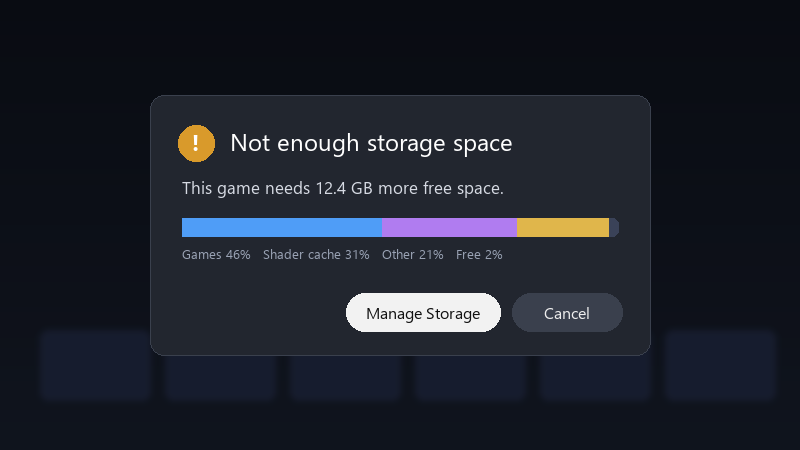
    Not enough storage space

    Not enough storage space
    This game needs 12.4 GB more free space.
    Games 46%   Shader cache 31%   Other 21%   Free 2%
    

    the storage screen shows shader cache using more than the game itself... my games are moslty on the SD card, but the cache seems to be on internal storage. is there a way to manage it, or move it?

    Id also like to understand whether this will keep happneing. If i clear it today, will it just fill up again next week? im about to throw this thing out the window lol


    facepalm

    1
  2. hmmmm quick q which model is ur my work PC? ?

    9 1 helpful
  3. by default, shader cache and Proton data for games on teh SD card are stored on the internal drive. thats why internal storage fills up even when games are on the card. fingers crossed 馃

    at this point my GPU cost more than my car lol

    6 0 helpful
  4. oh ive been there lol uninstalled games often leave their shader cache and compatdata folders behind xD Thats one of teh most common sources of mystery storage use.

    1 0 helpful
  5. Instead of deleting cache manually, its often easier to just upgrade teh SSD if u play a lot of big games.

    9 3 helpful

Reply to this topic

Sign in or create an account to reply.
