
My Xbox One X Downloads, Then Fails Right At The End

Solvederror-codeinstallxbox11 replies · 229 views · started
Accepted solution by Lea Jensen — yeahhh check free space on teh target drive under Settings System Storage devices . Installs need room for the download plus unpacking, so…
  1. okay, this is getting silly. my Xbox One X dwonloads a game i had installed before, gets close to finishing, and then:
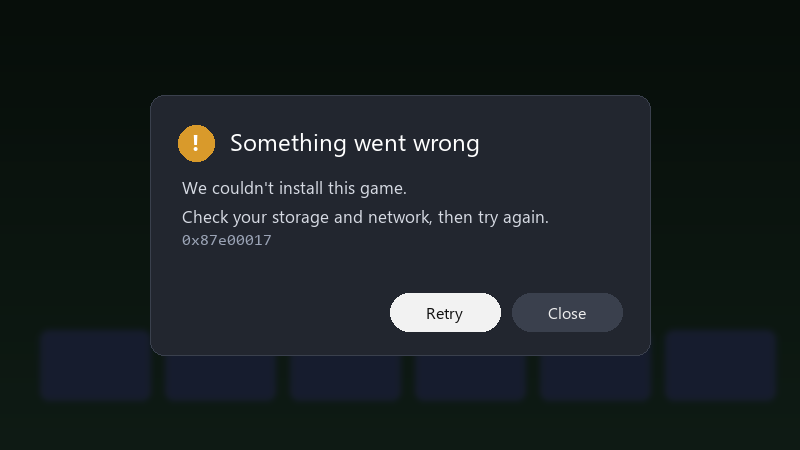
    Something went wrong

    Something went wrong
    We couldn't install this game.
    Check your storage and network, then try again.
    0x87e00017
    

    Ive cancelled and restarted the install three times. The game is gonna an external SSD. Id rather not delete a bunch of other stuff unless thats actually teh problem. Has anyone figured out what 0x87e00017 really means?

    I've seen a few forum posts mentioning a reset, but I really don't wanna redownload everything on my connection, smaller fixes first, please.


    0
  2. which drive is the game installing to, and how much free space does it have?

    rgb adds +10 fps everyone knows that

    0 6 helpful
  3. try turning off teh thermal paste first, fixed it for me fingers crossed 🤞

    2 2 helpful
  4. finally got it working, thanks everyone

    15 tabs open and chrome ate all 32GB of ram again

    1 2 helpful
  5. hmmmm quick q is xbox even worth bothering with or should i just leave it... told my boss it would take 10 mintues... its been all weekend

    1 0 helpful
  6. oof if you're installing to an external USB hard drive, try the internal drive as a test. Slow or failing external drives are a common source of install errors, and Series X|S games optimised for the consloe must run from internal or expansion storage anyway. good luck man!

    0 1 helpful
  7. oof as a last step before contacting support, use Settings > System > Console info > Reset console > Reset and keep my games & apps. It reinstalls the system software without deleting your installed games.

    0 0 helpful
  8. cancel the install, go to My games & apps > Manage > Queue, remove everything, then start only that one install. multiple queued items sometimes clash.

    1 0 helpful
  9. Accepted solution

    yeahhh check free space on teh target drive under Settings > System > Storage devices. Installs need room for the download plus unpacking, so a drive thats nearly full can fail even if teh final size looks like it fits. good luck man!

    0 2 helpful
  10. @lea_shader omg finally a full power cycle did it (held the power button ~10 sec, unplugged for a minute), and a game i had installed before installed on teh first try afterwards. Thanks, i had no idea the restart wasn't teh same thing.

    14 0 helpful

Reply to this topic

Sign in or create an account to reply.

