woke up excited to play, woke up to 0% instead

Solveddownloadps5rest-mode14 replies · 487 views · started
Accepted solution by Kofi Ortiz — ahh classic pause the download, then resume it before putting teh console to sleep xD A download thats stuck in the queue often stays…
  1. this has happened three nights in a row now with a 90 GB game on my launch-model PS5:
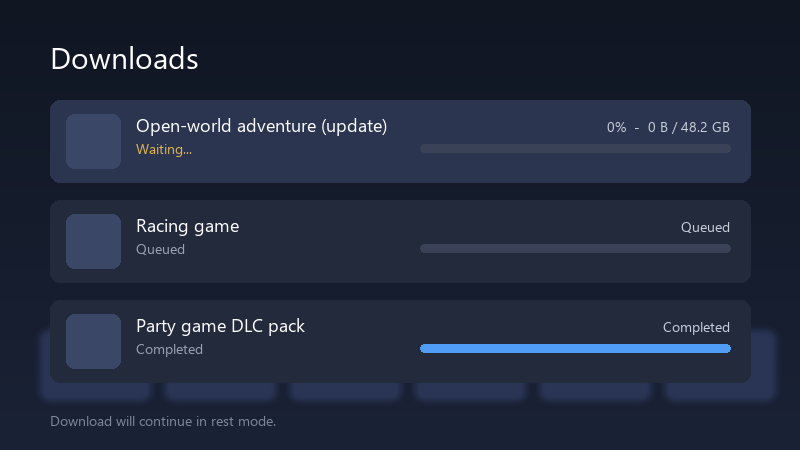
    Downloads

    Downloads
    Open-world adventure (update)   Waiting...   0%  -  0 B / 48.2 GB
    Racing game   Queued
    Party game DLC pack   Completed
    Download will continue in rest mode.
    

    The download only progresses while teh console is awake. Ive tested the connection and it passes. My setup is Wi-Fi. Im starting to wonder if rest mode cuts the network to save power. Any ideas before i start leaving it on all night??

    if it matters, the router is in another room, but the signal on the consoles netowrk screen says its decent. im happy to test whatever you suggest.


    1
  2. If youre on a mesh or powerline setup, try a direct cable for one night as a test. Rest mode keeps teh network on, but it reconnects after the console settles, and some mesh nodes hand it a weak connection.

    1 1 helpful
  3. lol same thing happened to me check Settings > System > Power Saving > Features Available in Rest Mode and make sure Stay Connected to teh Internet is turned on. without it teh console realy does drop teh network in rest mode.

    0 0 helpful
  4. unrelated but anyone else's coffee machine also judging them today. have u checked your launch-model settings? mine were reset after an update

    7 0 helpful
  5. hmmm safe Mode Clear Cache and Rebuild Database fixes queues that are stuck in a weird state. It doesnt remove games or saves.

    0 0 helpful
  6. lol same thing happened to me run Settings > Network > Connection Status > Test Internet Connection while the download is stuck. if the test hangs or the NAT type is 3, fix that first. downloads in rest mode are much less forgiving of a flaky connection.

    3 0 helpful
  7. Accepted solution

    ahh classic pause the download, then resume it before putting teh console to sleep xD A download thats stuck in the queue often stays stuck until its nudged once. worked for me anyway 🤷

    0 7 helpful
  8. have u checked your wi-fi settings? mine were reset after an update

    0 6 helpful
  9. exact same thing happened to my brand new build last month

    2 0 helpful
  10. @kofio324 omg finally pausing and resuming before rest mode did the trick... weird, but the queue moves now, tahnks! thank u thank u thank u

    1 4 helpful

Reply to this topic

Sign in or create an account to reply.



