shader cache vs storage: whats the right setup?

Solvedshader-cachesteam-deckstorage3 replies · 217 views · started
Accepted solution by Mateo Duarte — In Desktop Mode, you can look in /.local/share/Steam/steamapps/shadercache and compatdata, the folders are named by the app ID... removing…
  1. ok so my 256 GB Steam Deck keeps telling me Im out of space, and I barley have any games installed. When I looked closer, teh shader cache is taking several gigabytes:
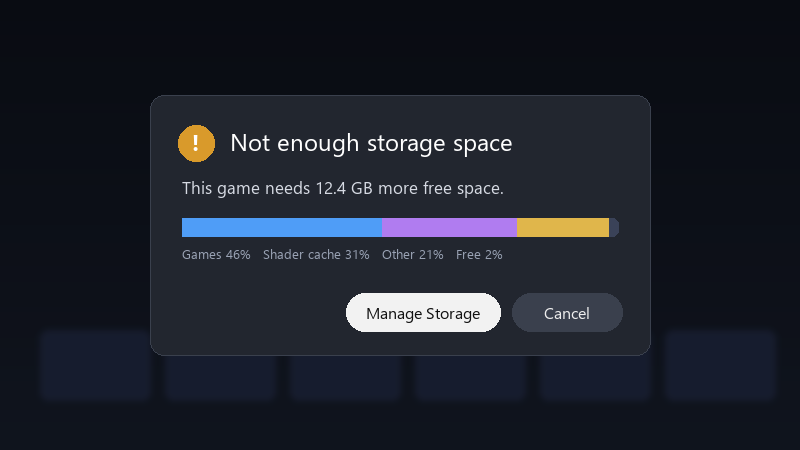
    Not enough storage space

    Not enough storage space
    This game needs 12.4 GB more free space.
    Games 46%   Shader cache 31%   Other 21%   Free 2%
    

    most of it seems to come from a racing game lol is it safe to delete?? and is there a way to stop it from growing like this?? id rather not keep uninstalling things every week.

    i'm not a Linux expert, sooo please exlpain like i'm five if it involves Desktop Mode :D i just want to play without constantly deleting things. what am i doing wrong??


    0
  2. Accepted solution

    In Desktop Mode, you can look in ~/.local/share/Steam/steamapps/shadercache and compatdata, the folders are named by the app ID... removing folders for games u no longer have installed is safe.

    lol

    36 5 helpful
  3. ugh. spent my entire lunch break on shader-cache and im still not done

    thinking

    3 0 helpful
  4. @cronworks deleted cache for uninstalled games and freed several gigabytes... my 256 GB Steam Deck breathes again... thanks! owe u a beer 🍺

    thumbsup

    0 1 helpful

Reply to this topic

Sign in or create an account to reply.

