My PS5 Digital Edition Refuses To Download In Rest Mode. What Setting Am I Missing?

downloadps5rest-mode14 replies · 274 views · started
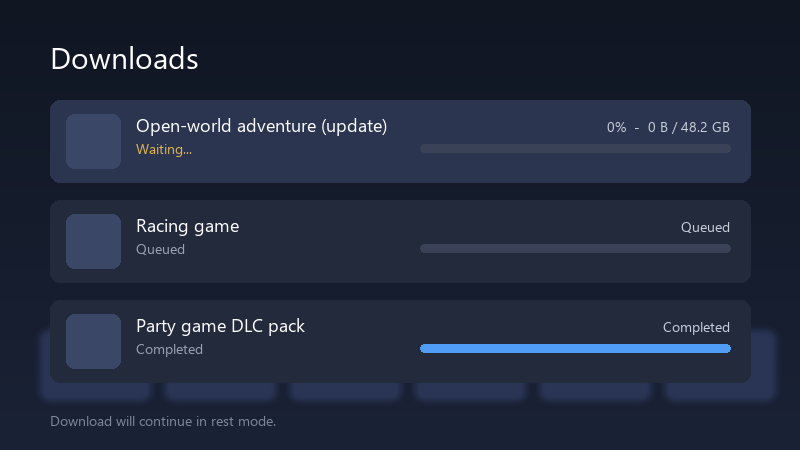
  1. ugh. every night I put my PS5 Digital Edition into rest mode with a 90 GB game queued, and every morning I find this:
    Downloads

    Downloads
    Open-world adventure (update)   Waiting...   0%  -  0 B / 48.2 GB
    Racing game   Queued
    Party game DLC pack   Completed
    Download will continue in rest mode.
    

    still 0%, still "Waiting...". if i turn teh console on and stay on teh downloads screen, it starts right away, so the internet clearly works. i'm on a mesh ntework. i don't get it. the whole point of rest mode is that i don't have to babysit it :D has anyone figured out what actually makes downloads run overnight? seriously need help here 😭

    my pc fans sound like a jet taking off but sure

    0
  2. what NAT type does the connection test show? ?

    12 0 helpful
  3. WOWWW finally got it working, thx everyone seriously made my day 😭🙏

    1 0 helpful
  4. oh ive been there lol pause teh download, then resume it before putting teh console to sleep. A download thats stuck in the queue often stays stuck until its nudged once. fingers crossed 🤞

    1 0 helpful
  5. run Settings > Network > Connection Status > Test Internet Connection while the download is stuck, if the test hangs or the NAT type is 3, fix that first, downloads in rest mode are much less forgiving of a flaky connection. hope that helps :)

    2 1 helpful
  6. @oskar.kaur thank u this worked!! seriously made my day 😭🙏

    13 1 helpful
  7. help!! told my boss it would take 10 minutes. its been 20 minutes im about to throw this thing out the window lol

    0 1 helpful
  8. Make suree theres enough free space for the download plus teh install. If the console cant reserve the space, some downloads just sit at waiting instead of showing an error. hope that helps :)

    24 0 helpful
  9. if ure on a mesh or powerline setup, try a direct cable for one night as a test... rest mode keeps teh network on, but it reconnects after teh console settles, and some mesh nodes hand it a weak connection. hope that helps :)

    0 0 helpful
  10. everyone keeps saying this but nobody posts proof

    lol

    2 1 helpful
  11. check Settings > System > Power Saving > Features Available in Rest Mode and make sure Stay Connected to the Internet is turned on. without it the console really does drop the network in rest mode. good luck man!

    14 0 helpful
  12. ehh honestly, if your power costs arent an issue, just leaving the console on the downloads screen is the most reliable option, rest mode is convenient, but its not perfect. but hey ymmv

    5 1 helpful

Reply to this topic

Sign in or create an account to reply.


