DRIFT PROBLEM: MENUS SCROLL BY THEMSELVES AND ITS DRIVING ME MAD

Solvedcontrollerdriftdualsense3 replies · 72 views · started

Accepted solution

by Ruben D.Jump to the reply

oh ive been there lol update the contrloler first: on the console go to Settings > Accessories > Controllers (General) > Wireless Controller Device Software with teh controller connected by USB 👍 Firmware wont fix worn hardware, but it rules out software. hope that helps :)

  1. ugh. im so annoyed. after a year with this limited-edition DualSense, suddenly menus scroll by themselves. heres the stick test with my hands off:
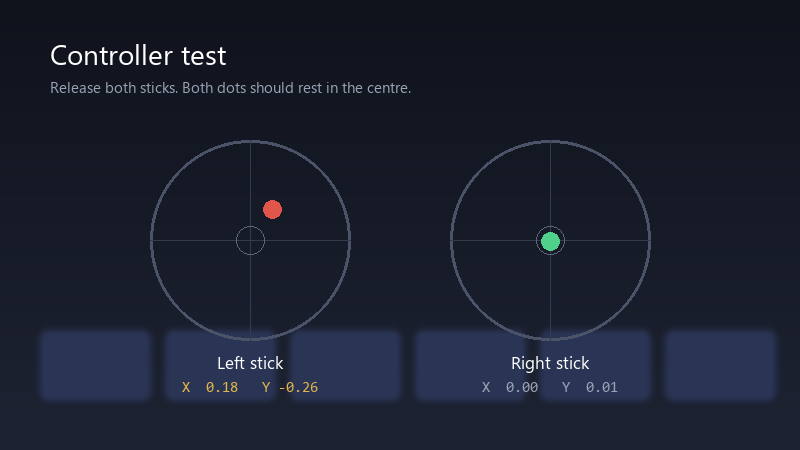
    Controller test

    Controller test
    Release both sticks. Both dots should rest in the centre.
    Left stick    X  0.18   Y -0.26
    Right stick   X  0.00   Y  0.01
    

    the right stick is perfect, the left one is clearly off-centre. I'm careful with my controllers, no drops, no throwing. before I spend money again, I want to know if there's smth I can do myself or through warranty.

    its frustrating cuz teh rest of the controller is in great shape: triggers, buttons and battery are all fine. only teh stick has decided to live its own life.

    somewhere an AI is confidently telling someone the wrong fix rn

    11
  2. Accepted solution

    oh ive been there lol update the contrloler first: on the console go to Settings > Accessories > Controllers (General) > Wireless Controller Device Software with teh controller connected by USB 👍 Firmware wont fix worn hardware, but it rules out software. hope that helps :)

    0 3 helpful
  3. reading this at 2am instead of sleeping, no rergets

    13 1 helpful
  4. @ruben_rusty sent it in under warranty with teh test video and got a replacement limited-edition DualSense. painless. thx for the tip about recording it. u guys are the best!!!

    9 0 helpful

Reply to this topic

Sign in or create an account to reply.