my xbox one says im offline while everything else in the house is online !!

Solvednetworksign-inxbox8 replies · 303 views · started
Accepted solution by Yusuf Ferreira — on a hotspot or shared building network, try a different connection temporarily. some shared networks block the ports the console needs,…
  1. I just wanna play online with my friends. My Xbox One wont sign me in since I changed my router, and I keep getting this:
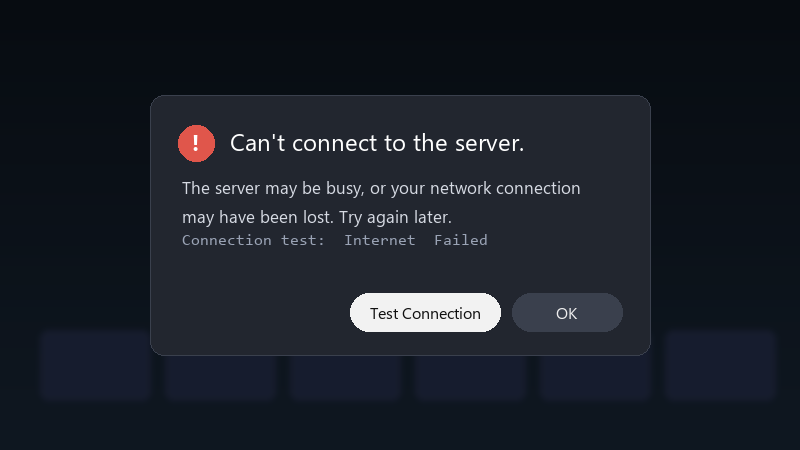
    Can't connect to the server.

    Can't connect to the server.
    The server may be busy, or your network connection
    may have been lost. Try again later.
    Connection test:  Internet  Failed
    

    the code it shows in the deatils is 0x80a40019. im on an apartment building network, and my phone and laptop are fine on teh same connection. i restarted the console and the ruoter. nothing. is there anything i can do on the console side, or is this out of my hands?

    offline games still work, sooo the console itself seems fine. its only teh sign-in and anything online that fails. im running out of ideas and patience. seriously need help here 😭

    my pc fans sound like a jet taking off but sure

    cry

    0
  2. Does it fail on other profiles too, or only yours??

    4 0 helpful
  3. ok so run Settings > General > Network settings > Test network connetcion and Test multiplayer connection 😭 Note the NAT type and any packet-loss warnings. That tells u whether it's local. worked for me anyway 🤷

    thumbsup

    0 1 helpful
  4. oof clear the alternate MAC address: Settings > General > Network settings > Advanced settings > Alternate MAC address > Clear, then restart teh console. This fixes a lot of sign-in issues after router changes. worked for me anyway 🤷

    lol

    3 0 helpful
  5. Accepted solution

    on a hotspot or shared building network, try a different connection temporarily. some shared networks block the ports the console needs, and a different network is teh quickest way to prove it. hope that helps :)

    0 9 helpful
  6. ok so exact same thing happened to my laptop last month

    8 6 helpful
  7. hmmmm not sure about that before clearing settings, just wait an hour and try again 😂 Sign-in problems are very often temporary server issues. just my 2 cents

    15 tabs open and chrome ate all 32GB of ram again

    2 12 helpful
  8. @yferreira WOWWW turned on UPnP on the router and the NAT is open now. sign-in works and the multiplayer test passes. thanks everyone. owe u a beer 🍺

    6 0 helpful

Reply to this topic

Sign in or create an account to reply.



