
Shader cache on my second-hand Steam Deck is taking several gigabytes

Solvedshader-cachesteam-deckstorage7 replies · 346 views · started
Accepted solution by Uma M. — oh ive been there lol uninstalled games often leave their shader cache and compatdata folders behind :) thats one of teh most common…
  1. My second-hand Steam Deck keeps telling me Im out of space, and i barely have any games installed. When i looked closer, teh shader cache is taking several gigabytes:
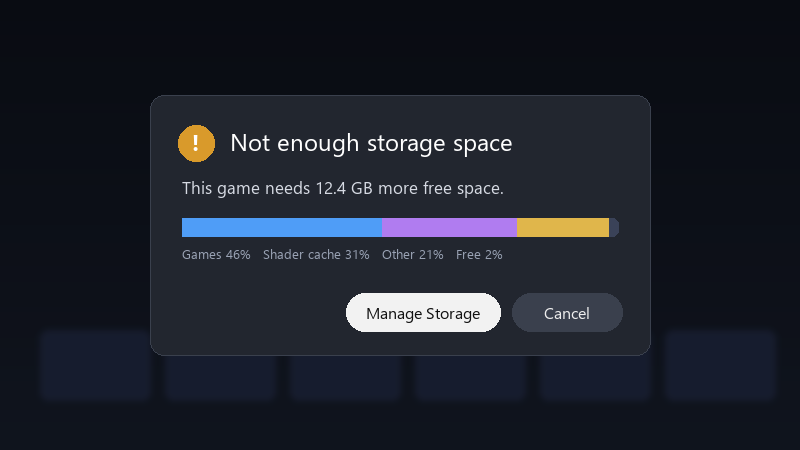
    Not enough storage space

    Not enough storage space
    This game needs 12.4 GB more free space.
    Games 46%   Shader cache 31%   Other 21%   Free 2%
    

    most of it seems to come from a Windows-only game through Proton. is it safe to delete? and is there a way to stop it from growing like this? id rather not keep uninstalling things every week.

    im not a Linux expert, so pls explain like Im five if it involves Desktop Mode... i just wanna play without constantly deleting things. thx in advance!!

    0
  2. uhh which model is your Windows 11 laptop? ?

    0 1 helpful
  3. yeahhh by default, shader cache and Proton data for games on teh SD card are stoerd on teh internal drive :) Thats why internal storage fills up even when games are on the card.

    1 0 helpful
  4. oof in Desktop Mode, you can look in ~/.local/share/Steam/steamapps/shadercache and compatdata. the folders are named by the app ID. removing folders for games you no longer have installed is safe. worked for me anyway 🤷

    lol

    0 2 helpful
  5. Accepted solution

    oh ive been there lol uninstalled games often leave their shader cache and compatdata folders behind :) thats one of teh most common sources of mystery storage use.

    0 5 helpful
  6. id leave shader pre-caching on. the stutter without it can be worse than losing some space. just my 2 cents

    0 0 helpful
  7. @umam412 yesss deleted cache for uninstalled games and freed several gigabytes... my seocnd-hand Steam Deck breathes again. thx! cant believe it was that simple lol

    2 0 helpful

Reply to this topic

Sign in or create an account to reply.

