How Do I Fix A Kernel Panic When I Cant Even Reach A Shell?

Solvedbootkernellinux15 replies · 450 views · started
Accepted solution by Fenna L. — oh ive been there lol first, boot teh previous kernel xD In GRUB pick Advanced options (Debian/Ubuntu) or the older entry in the list…
  1. applied updates on Debian and the reboot ended in this:
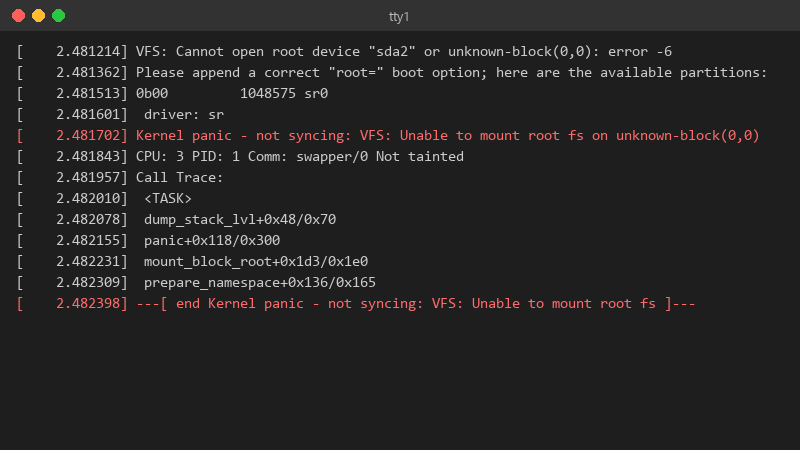
    2.481214 VFS: Cannot open root device "sda2" or unknown-block(0,0): error -6

    [    2.481214] VFS: Cannot open root device "sda2" or unknown-block(0,0): error -6
    [    2.481362] Please append a correct "root=" boot option; here are the available partitions:
    [    2.481513] 0b00         1048575 sr0
    [    2.481601]  driver: sr
    [    2.481702] Kernel panic - not syncing: VFS: Unable to mount root fs on unknown-block(0,0)
    [    2.481843] CPU: 3 PID: 1 Comm: swapper/0 Not tainted
    [    2.481957] Call Trace:
    [    2.482010]  <TASK>
    [    2.482078]  dump_stack_lvl+0x48/0x70
    [    2.482155]  panic+0x118/0x300
    [    2.482231]  mount_block_root+0x1d3/0x1e0
    [    2.482309]  prepare_namespace+0x136/0x165
    [    2.482398] ---[ end Kernel panic - not syncing: VFS: Unable to mount root fs ]---
    

    It mentions not being able to mount the root filesystem. Nothing chagned with the disks... pls tell me the data is still there.

    the update included a new kernel, and as far as I can remember there was a warning about disk space somewhere in teh output that I ignored. could that be related? id appreciate a calm waltkhrough, Im a little panicked myself.


    4
  2. ok but was /boot close to full before you updated? ?

    4 0 helpful
  3. Check /boot space: df -h /boot. if its full, remove old kernels (sudo apt autoremove --purge or sudo dnf remove --oldinstallonly), then reinstall the new kernel package so its initramfs is generated properly, and run update-grub or grub2-mkconfig -o /boot/grub2/grub.cfg. worked for me anyway 🤷

    thumbsup

    2 2 helpful
  4. ok so have u checked your debian settings? mine were reset after an update

    0 1 helpful
  5. guys pls help i swear kernel is cursed seriously need help here 😭

    15 0 helpful
  6. if teh panic mentions a module or driver, third-party modules (DKMS, out-of-tree storage or GPU drivers) may not have been rebuilt for teh new kenrel. dkms status shows whats built for which kernel. lmk how it goes

    7 0 helpful
  7. which version are you on?. try turning off the antivirus first, fixed it for me

    0 2 helpful
  8. hmmm for me it was teh router. swapped it and boom, fixed

    thinking

    37 2 helpful
  9. To rule out hardware, check whether the old kernel is stable over time and run smartctl -a on the disks. A failing disk tends to show I/O errors in dmesg well before a panic.

    5 0 helpful
  10. lol same thing happened to me VFS: Unable to mount root fs on unknown-block almost always means teh initramfs for teh new kernel is missing or incomplete (often because /boot was full during teh update)... from teh old kernel, rebuild it: sudo update-initramfs -u -k all on Debian/Ubuntu or sudo dracut -f --regenerate-all on RHEL/Fedora. worked for me anyway 🤷

    2 0 helpful
  11. oh ive been there lol first, boot teh previous kernel xD In GRUB pick Advanced options (Debian/Ubuntu) or the older entry in the list (RHEL family). If the old kernel boots, your data is fine and the problem is the new kernel or its initramfs. good luck man!

    thumbsup

    0 6 helpful
  12. lol same thing happened to me honestly just reset teh fan curve and save yourself teh pain hope that helps :)

    2 8 helpful
  13. ehh alternatively use snapshots before patching (LVM, Btrfs, or teh hypervisor) so the rollback is one click instead of GRUB surgery.

    1 0 helpful
  14. @fennal796 dude a DKMS module hadnt been built for the new kernel. dkms autoinstall fixed it and teh old Dell tower is back. thank u thank u thank u

    0 1 helpful

Reply to this topic

Sign in or create an account to reply.



