Is A Missing Initramfs Really Enough To Brick A Pop!_OS Install??

Solvedinitramfskernel-paniclinux3 replies · 253 views · started
Accepted solution by Emeka K. — if the older kernel wont boot either, use ur live USB and chroot: [code] since u enabled encryption, the root partition has to be unlocked…
  1. ok so i need a calm person to talk me down.
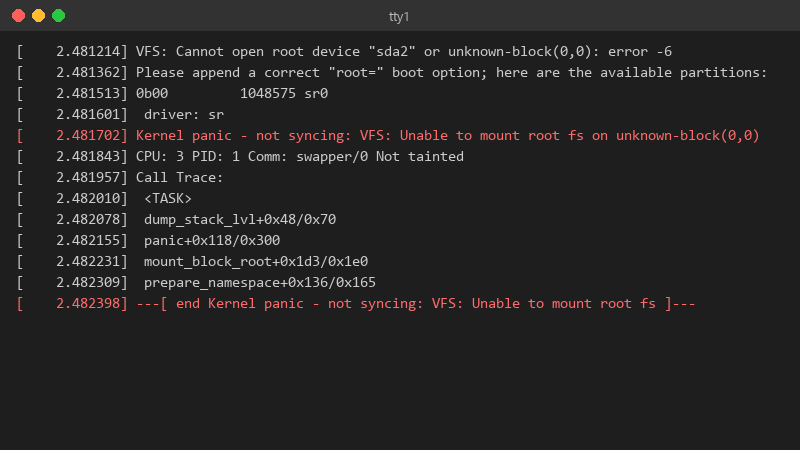
    2.481214 VFS: Cannot open root device "sda2" or unknown-block(0,0): error -6

    [    2.481214] VFS: Cannot open root device "sda2" or unknown-block(0,0): error -6
    [    2.481362] Please append a correct "root=" boot option; here are the available partitions:
    [    2.481513] 0b00         1048575 sr0
    [    2.481601]  driver: sr
    [    2.481702] Kernel panic - not syncing: VFS: Unable to mount root fs on unknown-block(0,0)
    [    2.481843] CPU: 3 PID: 1 Comm: swapper/0 Not tainted
    [    2.481957] Call Trace:
    [    2.482010]  <TASK>
    [    2.482078]  dump_stack_lvl+0x48/0x70
    [    2.482155]  panic+0x118/0x300
    [    2.482231]  mount_block_root+0x1d3/0x1e0
    [    2.482309]  prepare_namespace+0x136/0x165
    [    2.482398] ---[ end Kernel panic - not syncing: VFS: Unable to mount root fs ]---
    

    Thats my Pop!_OS laptop after enabling disk encryption. It just freezes there with the caps lock light blinking, i have a live USB from when i installed it. Im comfortable with a terminal but Ive never had to repair a boot before ;) Is this fixable without reinstalling?? 😭 i can boot teh live USB and see teh drives partitions, and my files look like theyre still there. So teh disk is alive. i just dont understand what the system is missing at boot.

    6
  2. Accepted solution

    if the older kernel wont boot either, use ur live USB and chroot:

    sudo cryptsetup luksOpen /dev/nvme0n1p3 cryptdata
    sudo vgchange -ay
    sudo mount /dev/mapper/data-root /mnt
    sudo mount /dev/nvme0n1p1 /mnt/boot/efi
    for d in dev proc sys run; do sudo mount --bind /$d /mnt/$d; done
    sudo chroot /mnt
    

    since u enabled encryption, the root partition has to be unlocked with cryptsetup first, mounting it directly wont work. Adjust teh device and volume names to match lsblk, then regenerate the initarmfs inside the chroot (update-initramfs -c -k all). lmk how it goes

    1 5 helpful
  3. id hold off on chroot until uve tried the older kernel. people jump into chroot and mount the wrong partition under stress.

    10 0 helpful
  4. @subnet_den yesss it was the full /boot.. 😤 cleaned it up properly and Pop!_OS is back, i set a reminder to remove old kerenls now. seriously made my day 😭🙏

    15 6 helpful

Reply to this topic

Sign in or create an account to reply.