is it dhcp options or ip helpers? pxe boot fails and i'm going in circles lol

dhcposdpxesccm5 replies · 6 views · started
  1. guys pls help picture a new hardware batch arriving, the boss asking when theyll be ready, and every machine doing this when you try to network boot:
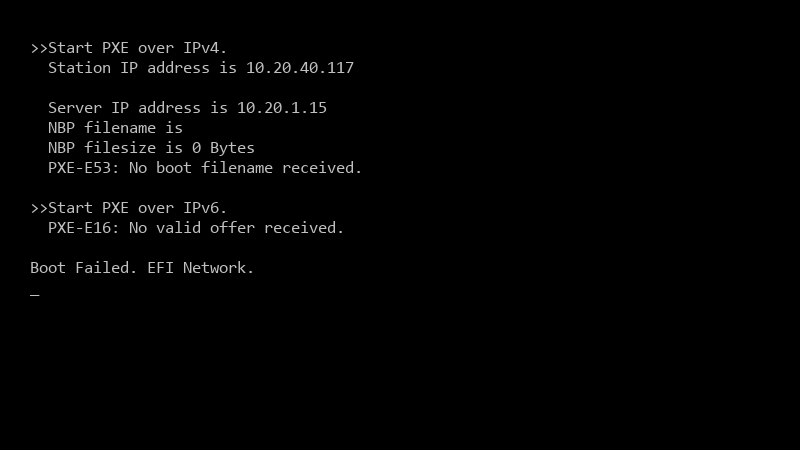
    >>Start PXE over IPv4.

    >>Start PXE over IPv4.
      Station IP address is 10.20.40.117
    
      Server IP address is 10.20.1.15
      NBP filename is
      NBP filesize is 0 Bytes
      PXE-E53: No boot filename received.
    
    >>Start PXE over IPv6.
      PXE-E16: No valid offer received.
    
    Boot Failed. EFI Network.
    
    13
  2. yeahhh first look at SMSPXE.log on the distribution point. If it shows nothing at all when teh client boots, the PXE request never reached the DP: thats a network or DHCP problem. If it shows teh reuqest and then says something like no advertisemetns found, the network is fine and its a ConfigMgr deployment problem. hope that helps :)

    3 1 helpful
  3. yeahhh the most reliable setup is IP helpers (DHCP relay) on the router or switch pointing at both the DHCP server and the PXE-enabled DP, with no DHCP options 66/67. options 66/67 hand out a single boot file, which breaks when u have a mix of BIOS and UEFI clients. if somoene added options 66/67 in teh past, reomve them and use IP helpers instead. worked for me anyway 🤷

    0 6 helpful
  4. On the ConfigMgr side, check:

    1. A task sequence is deployed to a collection the machine belongs to, available to "Configuration Manager clients, media and PXE".
    2. For brand-new machines, that collection is Unknown Computers (or the device is imported).
    3. The boot image used by that task sequence has "Deploy this boot image from the PXE-enabled distribution point" enabled on its Data Source tab, and is disrtibuted to that DP.
    4. You have an x64 boot image for UEFI x64 clients.

    lol

    1 0 helpful
  5. DHCP options 66/67 arent always wrong. in a tiny single-subnet lab with only UEFI machines they work and are quicker to set up lol they just dont scale once you have mixed fimrware or multiple subnets, so treat them as a lab shortcut.

    facepalm

    0 4 helpful
  6. ok so u guys forgot one of teh most annoying things... check teh physical switch ports. if teh new hardware is on a VLAN that isnt actually routed to the DP, itll never see teh request. i once spent 3 hours troubleshooting dhcp options only to find out the switch port was locked down or on a dead-end vlann. also, double check the NIC drivers on those new boxes if they use weird hardware. sometimes they need a specific driver just to see teh PXE offer in the first place. i'd also check if teh DP's firewall is actually letting traffic through on port 67/68 for that specific subnet. hoenstly, just check the logs on teh DP for any good luck man!

    0 1 helpful

Reply to this topic

Sign in or create an account to reply.



