Updates And Servicing Blocked By A Prerequisite I've Never Even Heard Of lol

Solvedprerequisitessccmsite-upgradesql3 replies · 2 views · started
Accepted solution by Diego Rahman — the full details are in ConfigMgrPrereq.log in the root of teh site servers system drive (C:\ConfigMgrPrereq.log). Every check is listed…
  1. Picture finally scheduling the maintenance window for the ConfigMgr site update, getting change approval, and then the prerequisite check comes back like this:
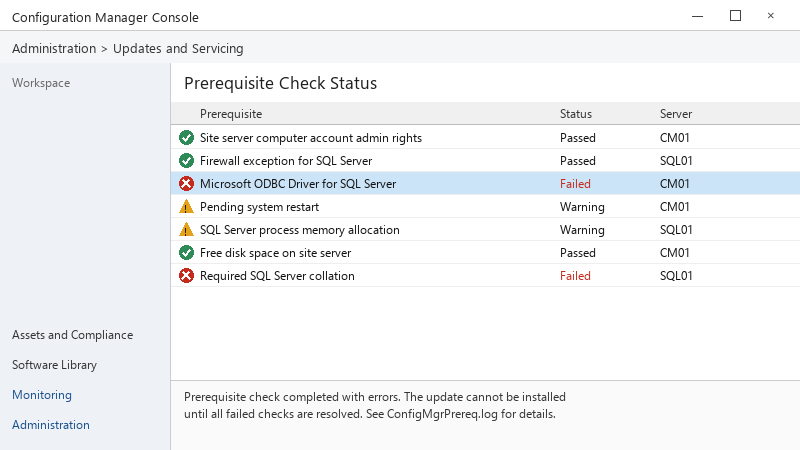
    Prerequisite Check Status

    Prerequisite Check Status
    Prerequisite                                Status    Server
    Site server computer account admin rights   Passed    CM01
    Firewall exception for SQL Server           Passed    SQL01
    Microsoft ODBC Driver for SQL Server        Failed    CM01
    Pending system restart                      Warning   CM01
    SQL Server process memory allocation        Warning   SQL01
    Free disk space on site server              Passed    CM01
    Required SQL Server collation               Failed    SQL01
    
    Prerequisite check completed with errors. The update cannot be installed
    until all failed checks are resolved. See ConfigMgrPrereq.log for details.
    

    two failures and two warnings... the window is tonight. i dont want to start installing random things on the site server without understanding them.


    2
  2. the full details are in ConfigMgrPrereq.log in the root of teh site servers system drive (C:\ConfigMgrPrereq.log). Every check is listed there with its result and a short reaosn. In the console, Administration → Updates and Servicing → select the update → Show Prerequisite Status gives teh same information per item.

    2 2 helpful
  3. lol same thing happened to me hey, for the collation failure, read teh exact text in teh log, configMgr requires a specific SQL collation for the site database and SQL instance, if the instance was installed with a different collation, that isnt a quick fix and needs planning, so dont try to change it inside tonights window.

    Let us know how it goes.

    thinking

    36 0 helpful
  4. @diego.rahman moved the reporting database off that new instance, reran teh check, and only the SQL memory warning remains.. 🙏 update finished fine. owe u a beer 🍺

    1 0 helpful

Reply to this topic

Sign in or create an account to reply.
